← Features·Custom Product

Sell Custom Services Online —
audits, reviews, roadmaps, personalized answers.

Sell audits, reviews, personalized roadmaps, AMAs — anything that exists only after the buyer orders it. Custom intake forms collect what you need up front, you deliver manually via email or Loom. 0% commission, you keep every cent.

  • Custom intake forms — collect the brief before you start
  • Manual delivery via email, DM, or Loom — no file to prep in advance
  • Free mode for lead capture, paid mode for the real work
No card 14 days free 0% commission
Sell custom services online from your creator store
What you can sell

What custom services can you sell?

Same product type, many creative directions. Anything you can deliver manually — audits, reviews, custom plans, written feedback, Loom walkthroughs — fits here.

Strategy & business audit

Pitch deck, business plan, or GTM reviewed line-by-line. Delivered as PDF or Loom in 48 hours. Higher-margin offer for business coaches and consultants. Usually $99-499.

Resume / LinkedIn / pitch audit

Career coaches review CVs, LinkedIn profiles, or founder pitches. Written feedback via email in 48 hours. One of the highest-converting coaching offers. $49-199 per review.

Ask Me Anything

Buyer submits one question, you reply text or video within 24-48 hours. Async coaching at scale — answer once, paid per question. $9-49 per AMA.

Course / curriculum review

Educators and course authors send their draft outline; you return a marked-up PDF with feedback. Recurring add-on after launching your own course. $99-299 per review.

Personalized roadmap

Buyer fills a brief (goals, timeline, skill level), you build a custom roadmap PDF or Notion doc. Life, fitness, and learning coaches sell these at premium prices. $99-499.

Funnel / sales copy review

Marketing coaches review landing pages, launch emails, or ad creative — return rewritten copy or a recorded Loom walkthrough. $99-249 per review.

Portfolio / design critique

Designers, developers, and photographers review portfolios or specific projects — return written feedback and a scored assessment. $79-249 per critique.

Custom research or brief

Consultants, market researchers, and analysts deliver a custom research doc based on the buyer's specific question. $199-799 depending on depth.

How to create

How to set up custom services online

Three required steps get your service live — Thumbnail, Checkout, Options. Two more are optional polish: SEO settings and a personalized confirmation email. Do them now, come back later, or skip entirely. The defaults work.

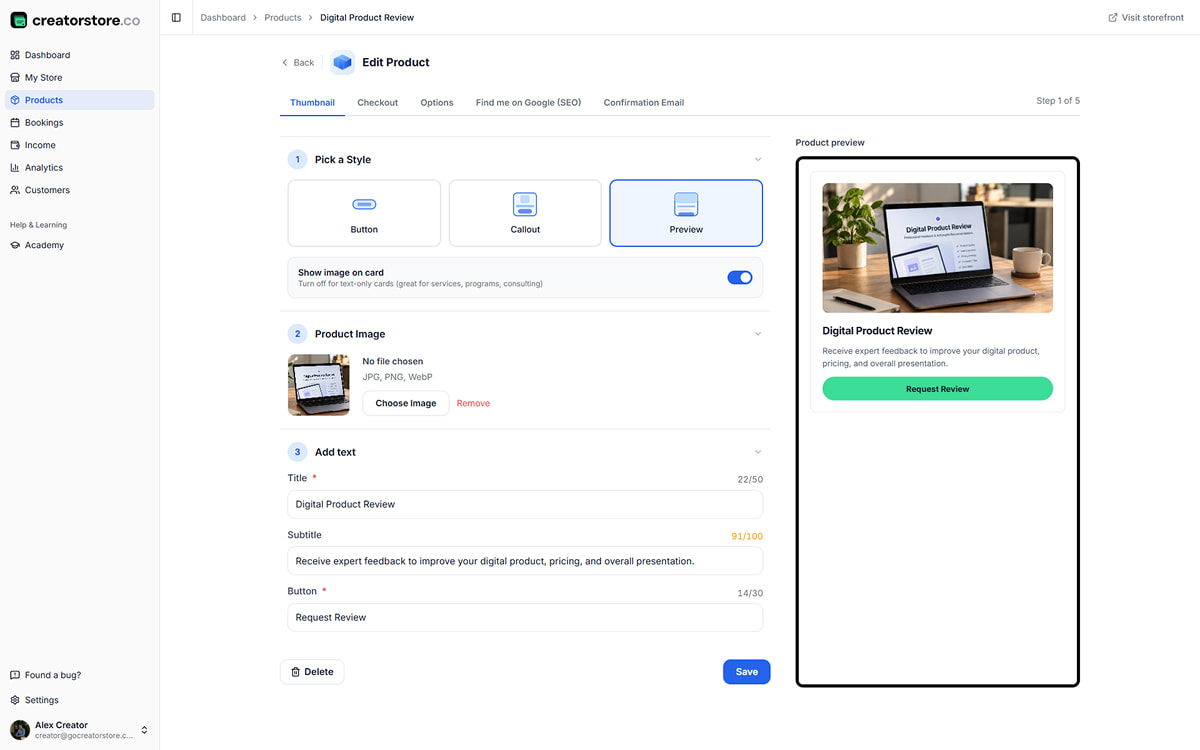
Admin Step 1 — Thumbnail: pick card style, upload cover image, add title, subtitle, and 'Order now' button
Required
Step 01 · Thumbnail

Choose how your custom service shows up

Three card layouts to pick from — a Preview card with an image, subtitle, and price, a horizontal Callout for compact stores, or a Button that's just tap-to-order. Upload the cover image, add a title like "MVP Strategy Audit", a subtitle like "48h written review", and a button label like "Order now". Whatever you type shows up in the live preview on the right.

  • 3 card styles + "Show image on card" toggle
  • Live storefront preview updates as you type
  • Character counters for title, subtitle, and button
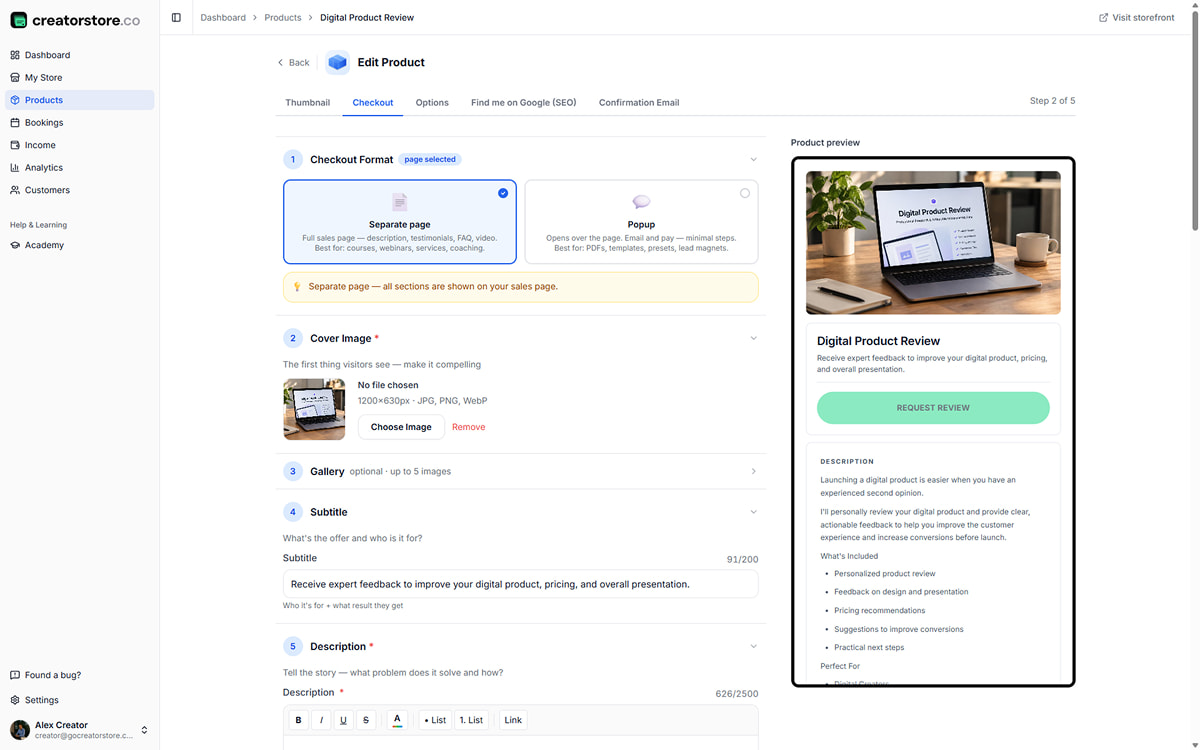
Admin Step 2 — Checkout: sales page builder with cover, gallery, description, video, guarantee, testimonials, service FAQ, and Collect Info intake fields
Required
Step 02 · Checkout

Build the sales page + set up the intake form

This is where the sales page comes together. A cover image plus up to five gallery shots or examples of past work. Subtitle and a rich-text description with "What's Included", "Perfect For", and "How It Works" lists. A short pitch video from YouTube, Loom, or Vimeo if you want one. A guarantee block for turnaround promises. Testimonials with star ratings. A categorized FAQ with service-specific questions pre-filled ("What types can you review?", "How do I submit?", "When will I receive feedback?"). Plus a "Collect Info" section at the bottom — this is your intake form. Email and Full Name are captured by default. Add your own custom fields (Product URL, Additional Notes, whatever the brief needs) with required/optional flags.

  • Separate page or popup checkout format
  • Testimonials with photo/initials + 0-5 rating
  • FAQ tagged: Access · Refund · Suitability · Format · Support · Before you order
  • Collect Info section — custom intake fields per service (Email, Name, URL, Notes, choice…)
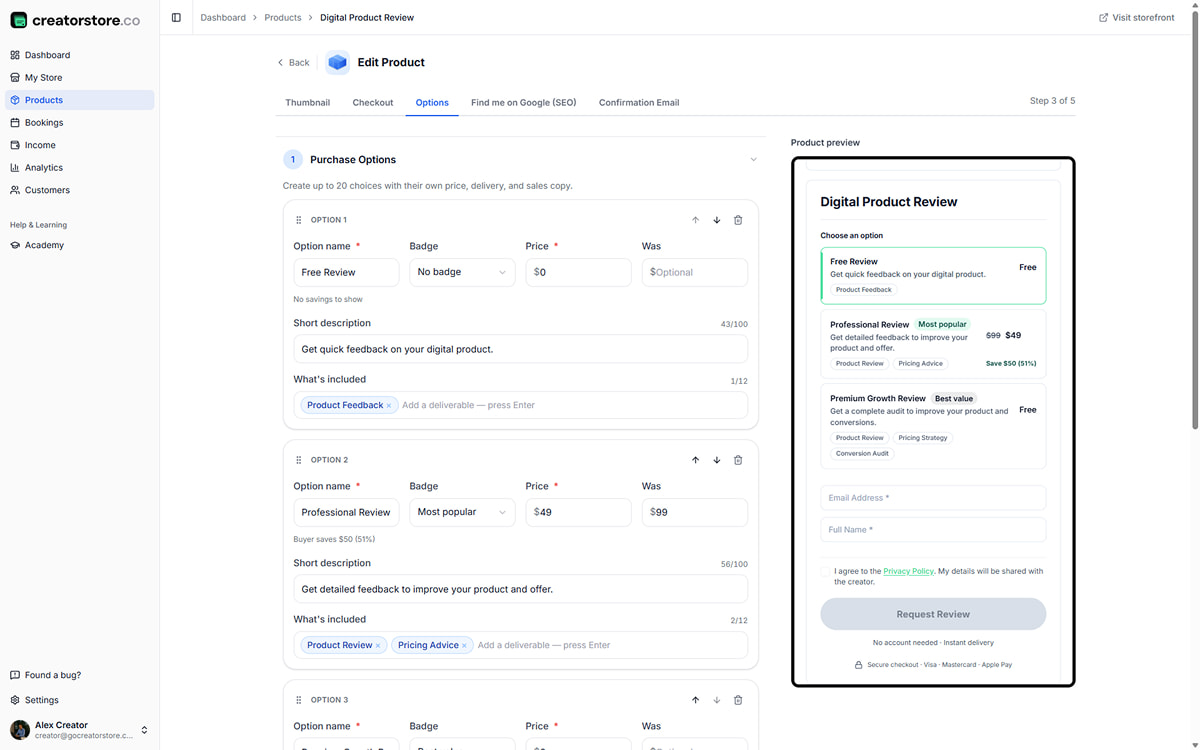
Admin Step 3 — Options: multiple purchase options with names, badges, prices, was prices, and 'What's included' scope tags per tier
Required · Service goes live after this step
Step 03 · Options

Set up purchase options with different scopes and prices

This is where the service comes together. Add multiple purchase options — Free Review ($0), Professional Review ($49, "Most popular"), Premium Growth Review ($149, "Best value"). Each with its own name, badge, price, and "What's included" scope tags (Product Feedback · Product Review · Pricing Advice · Conversion Audit · Sales Page · Growth Strategy). Add a "was" price if there's a discount — savings display automatically ("save $50 · 51%"). Up to 20 options per service. Configure currency, savings display ($, %, or both), and terms per option. Once you save this step, buyers can order.

  • Up to 20 purchase options per service
  • Optional badges: "Most popular", "Best value", "No badge"
  • Per-option "What's included" scope tags
  • Free tier ($0) works for lead capture
  • Savings display: $, %, or both — auto-calculated from "was" price
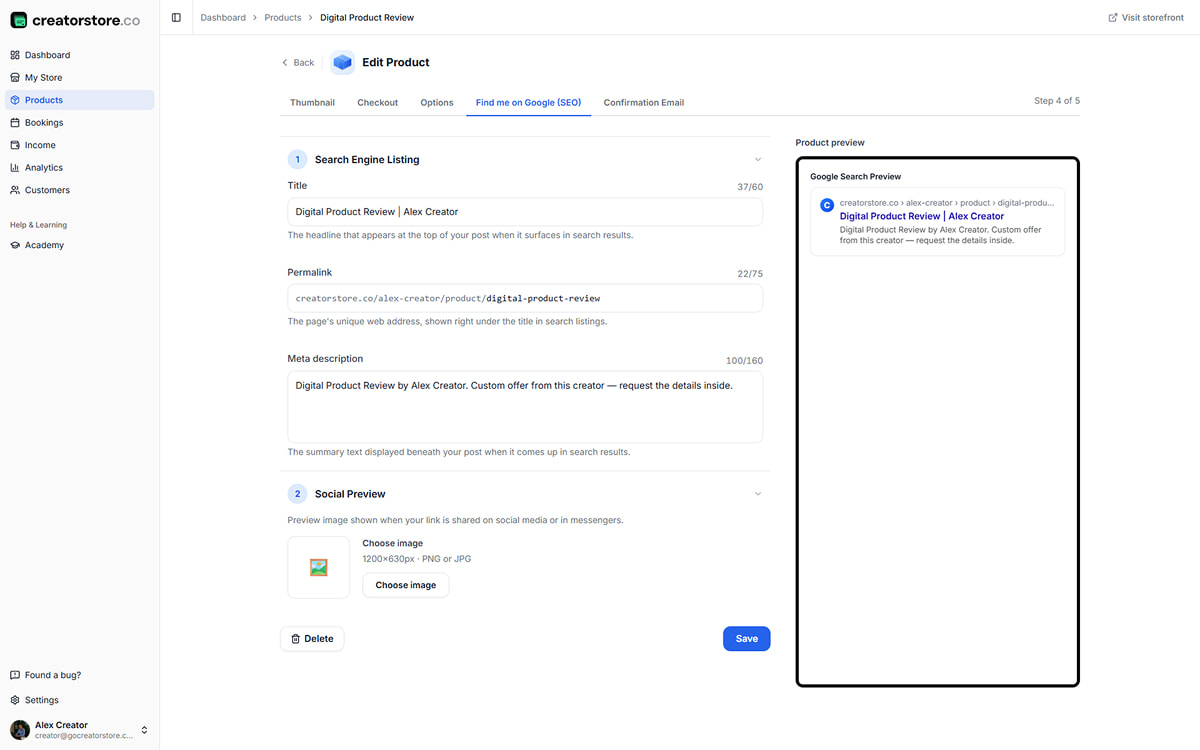
Admin Step 4 — SEO: meta title, permalink, description with live Google search preview
Optional · Add anytime
Step 04 · Find me on Google

Get your custom service found on Google

Standard SEO stuff, but visual. Type your meta title, permalink, and meta description — character counters run so you don't overshoot Google's cut-off (60, 75, and 160 characters respectively). On the right, a live Google preview shows exactly how your service will look in search results. Same for the social image if you upload one — see the FB/LinkedIn card before it goes public.

  • Live Google snippet preview
  • Social image (1200×630) with live preview for FB/LinkedIn/Slack
  • Auto-generated permalink from title
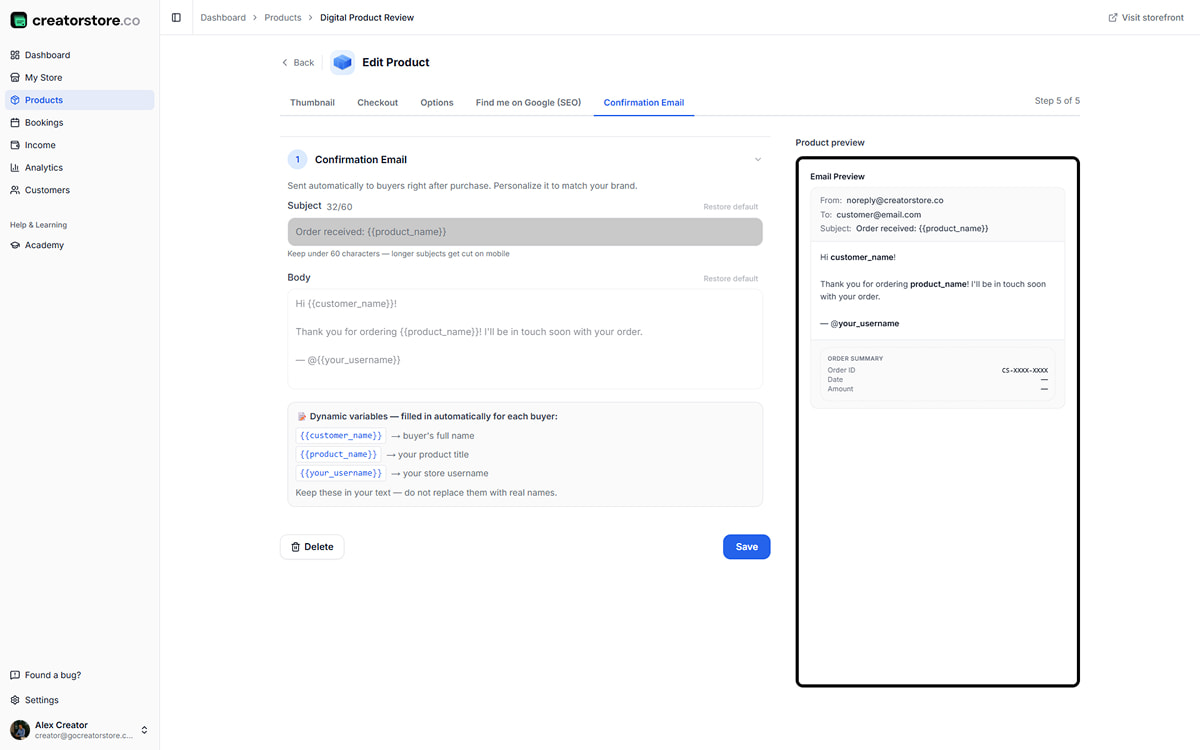
Admin Step 5 — Confirmation Email: customize subject and body with dynamic variables, live email preview with intake summary and turnaround date
Optional · Default works out of the box
Step 05 · Confirmation Email

Personalize the order confirmation

The default email works fine — order details, turnaround promise, and intake summary go out automatically. But you can rewrite it to sound like you. Edit the subject like "Your audit is in the queue, {{customer_name}}" and body, drop in variables like {{customer_name}}, {{product_name}}, or {{your_username}}. On the right you see exactly what the email will look like, Order Summary and intake responses included.

  • 3 dynamic variables + more coming
  • Live email preview with Order Summary
  • Turnaround promise auto-included ("Delivery by [date]")
  • "Restore default" button
Open your service shop →

Free plan · No card required · First service live in 10 minutes

Built for custom work

Built for custom work — intake forms, manual delivery, no add-ons

The all-in-one custom service software for creators

Custom intake forms, Stripe checkout, confirmation emails, customer database — everything you need to run a service business. Eight essentials, all built in.

Custom intake forms

Collect the brief before you start. Short text, long text, multi-choice, file uploads, URL fields. Required or optional. Set once per product.

Manual delivery — no file upload

Custom Product doesn't have an upload step. Buyer pays, you deliver via email, DM, or Drive — however the work needs to ship. Perfect for outputs that don't pre-exist.

Confirmation emails

After payment, buyer gets an auto-confirmation with turnaround promise and intake summary. Fully customizable — write once, sent forever.

Customer database

Every Custom Product buyer lands in My Customers — name, email, order history, total spent. Filter by product, export CSV, message returning buyers.

Testimonials & FAQ built in

Each service page can show testimonials (with ratings) and an FAQ accordion. Pre-empts buyer objections inline — "how long?", "what if I don't like it?".

Stripe + PayPal + Monobank

All three payment rails. 0% platform commission — you keep every cent minus processor fees. Buyer pays instantly, order lands in your dashboard.

Auto Terms & Conditions

Fill 4 fields, get a 16-section document. Refund policy, guarantee terms, turnaround promises — linked at checkout, auto-published.

Free + paid modes

Set price to $0 for lead capture or portfolio submissions — same intake form, buyers still submit. Switch to paid in one click when you're ready.

What buyers see

How your custom services look on the site

Once your service is live, buyers see it in three places — as a card on your store, as a dedicated sales page (Google indexes it), and inside the checkout flow where they fill the intake form and pay. Real example: creatorstore.co/@alex-creator.
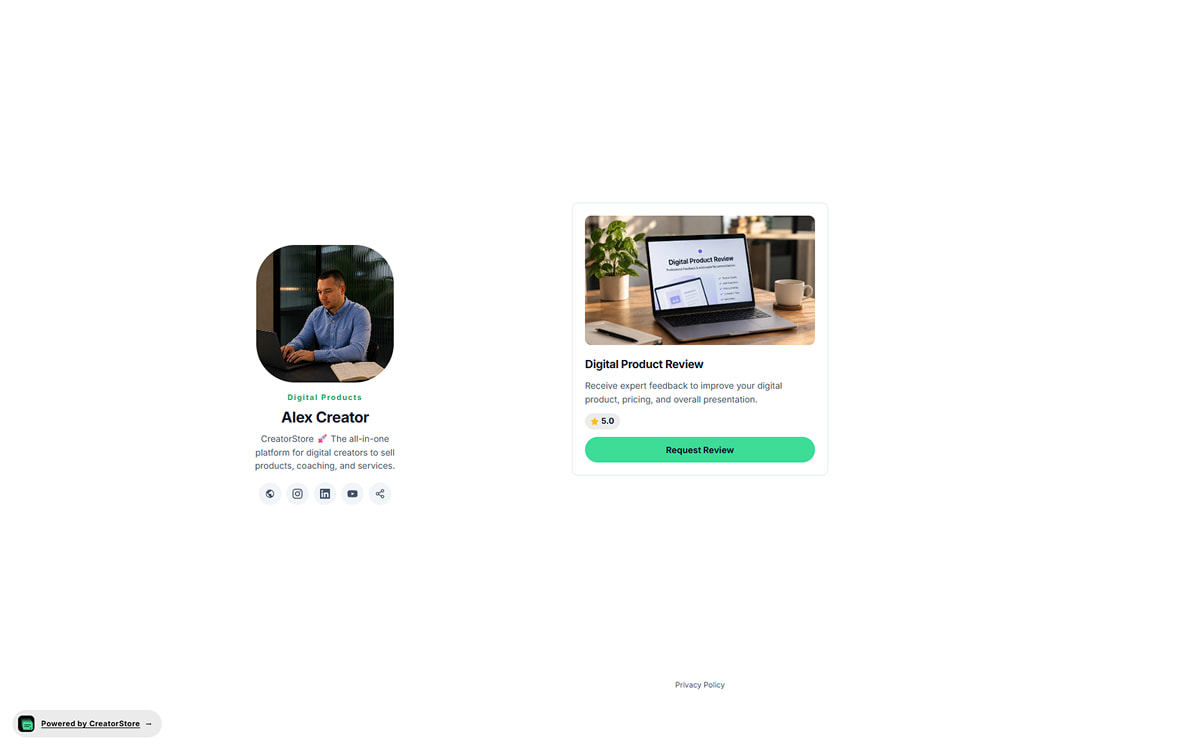
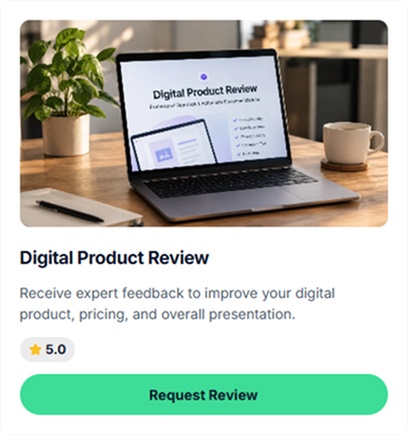
Custom service card on storefront — cover image, title, subtitle, price, and Order now button
View 01 · On your store

How your service shows up as a card

Your custom service sits on your CreatorStore page as a clean card — cover image, title, subtitle (turnaround time), price, and "Order now" button. Buyers see the whole offer in a glance. One tap and they're either ordering through a popup or opening the full sales page.

  • Three card styles to pick from (Preview, Callout, Button)
  • Turnaround time visible on the card ("48h written review")
  • Sits inside your storefront layout — no external redirect
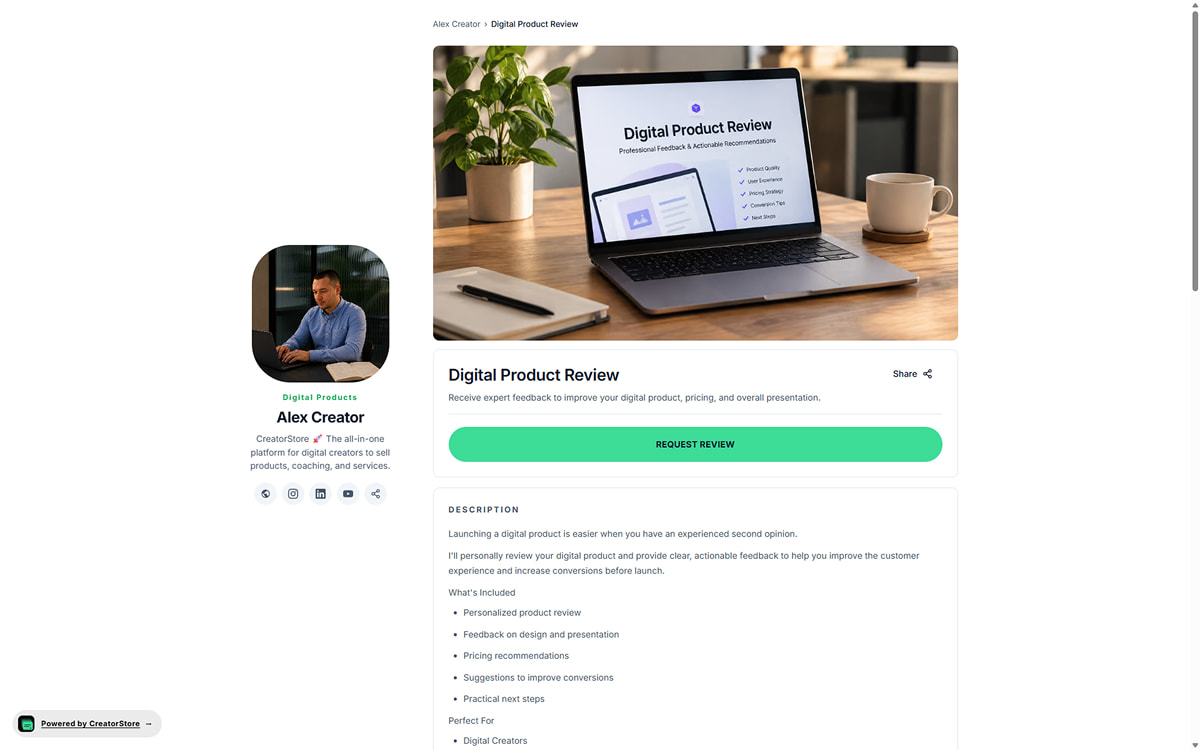
Dedicated custom service sales page with breadcrumb, cover image, title, description, testimonials, guarantee, and FAQ
View 02 · Product page

A dedicated sales page Google indexes

Every service gets its own page, on its own URL. Google crawls it and can send organic traffic straight to the order form. This page holds everything a buyer needs to decide — cover image, gallery of past examples, description of what you deliver, testimonials, guarantee terms, and FAQ. Nothing else in the way.

  • Its own URL, own meta title and description
  • Indexed by Google automatically
  • Full sales page: examples, testimonials, guarantee, FAQ
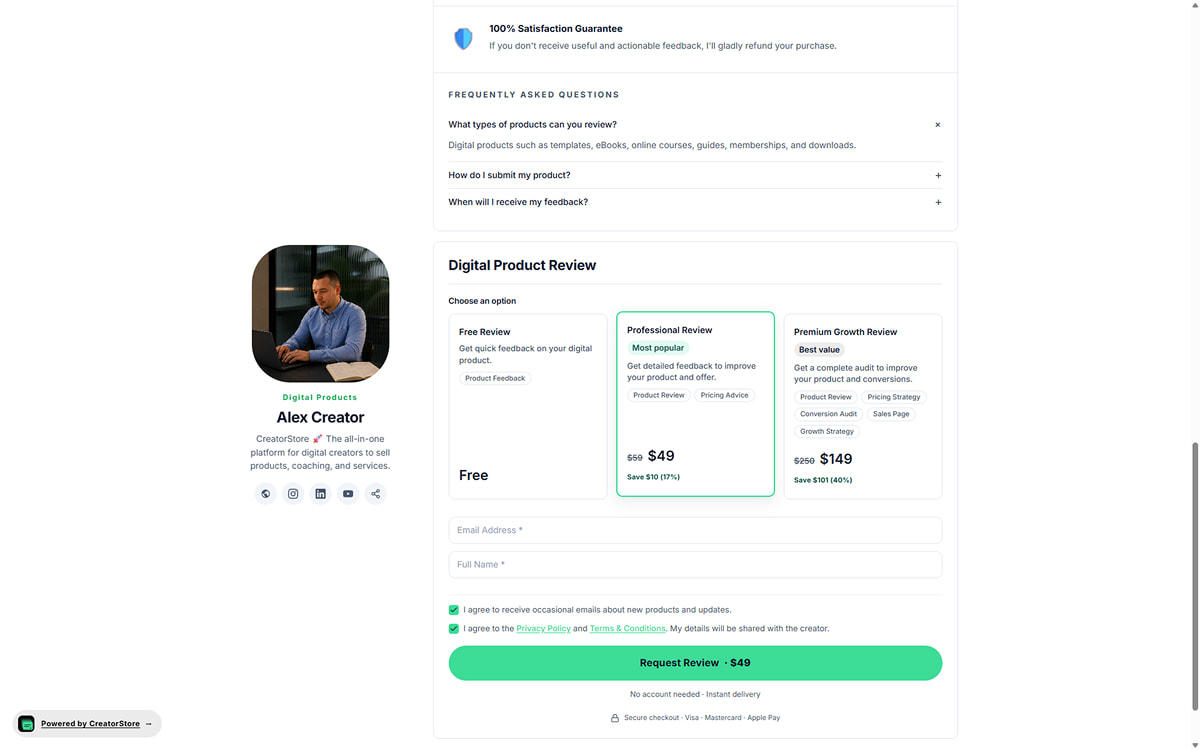
Purchase options and checkout — buyer picks Free Review / Professional Review / Premium Growth Review tier, fills intake (Email, Full Name, Product URL, Notes), agrees to terms, submits
View 03 · Options & checkout

Pick an option, fill the brief, submit — one screen

Buyer clicks "Request Review" and the options open — Free Review, Professional Review ($49, "Most popular", save $50 · 51%), Premium Growth Review ($149, "Best value"). Each shows its "What's included" scope tags (Product Review, Pricing Advice, Conversion Audit…). Buyer picks a tier, fills your intake fields (Email, Full Name, Product URL, Additional Notes), agrees to consent, submits. Stripe, PayPal, or Monobank clears the payment, and the order lands in your dashboard with the tier chosen and all their intake responses.

  • Up to 20 pricing options with badges and scope tags side by side
  • Auto-calculated savings ("save $50 · 51%") on discounted tiers
  • Intake fields (Email, Name, custom fields) inline with tier picker
  • Order + tier + intake responses land in your dashboard instantly
See a live example →

Real creator store — click around to see how custom services actually work

Behind one order

How the custom service flow works — from purchase to delivery

One order, one delivery. Buyer pays, submits the brief, you do the work, they receive it. No queue, no calendar, no file to prep in advance.

01
Order

Client orders and fills the brief

They submit your intake form with all the info you asked for. Stripe, PayPal, or Monobank handles payment. Turnaround promise shows in the confirmation.

02
Receive

Order lands in your dashboard

You get an auto-notification with the brief, uploaded files, and payment confirmed. Everything you need to start work — in one screen.

03
Deliver

You deliver manually

Do the audit, write the review, record the Loom. Email it, DM it, share a Drive link — however you want to ship. CreatorStore doesn't force a delivery method.

04
Follow up

Mark complete + upsell

Mark the order complete in the dashboard. Send a follow-up asking for a testimonial. Offer them your next service. Repeat customer becomes your best client.

Your dashboard

Track orders, customers, and revenue across your whole store

Once orders start rolling in, you need a place to see what's working. Analytics for the big picture, deeper insights for traffic sources and conversion, Customers view for who bought what, Income view for every transaction across Stripe and Monobank. No juggling Fiverr + Stripe dashboard + a spreadsheet.

Analytics overview — 8 stat cards (Revenue, Sales, Customers, Page Views, Free claims, Webinar registrations, Avg Order Value, Payout Balance) plus Store Visits & Purchases chart
Screen 01 · Analytics

See revenue, sales, and traffic in one screen

Every metric that matters — Revenue, Sales, Customers, Page Views, Free claims, Webinar registrations, Avg Order Value, Payout Balance — as stat cards up top. A bar chart shows Store Visits & Purchases over the last 30 days with Visits, Purchases, and Free claims layered together. Filter by All time, Today, 7/30/60/90 days, or a custom range. See what's working, what's not, without opening a spreadsheet.

  • 8 stat cards with trend arrows and period comparison
  • Store Visits & Purchases chart (last 30 days)
  • Time filter: All time · Today · 7/30/60/90 days · Custom range
  • Product-level breakdown with revenue, sales, and claims per product
Visitor Journey funnel (Page Views to Product Views to Checkout Started to Purchased) plus Traffic Sources breakdown (Direct, Instagram, Facebook, LinkedIn) and Top Pages list
Screen 02 · Visitor Journey

Where visitors come from and how they convert

Three tables in one screen. Visitor Journey shows the funnel — Page Views → Product Views → Checkout Started → Purchased — with visitor counts and percentages so you see exactly where buyers drop off. Traffic Sources breaks down where visits come from — Direct, Instagram, Facebook, LinkedIn, and more — so you know which channels are worth the effort. Top Pages ranks your most-visited pages with view counts.

  • Visitor Journey funnel: Page Views → Product Views → Checkout → Purchase
  • Traffic Sources: Direct, Instagram, Facebook, LinkedIn, and more
  • Top Pages: which pages get the most views
  • Percentage share for every source and stage
My Customers view — table of all buyers with last purchase date, name, last product, product type, marketing email status, orders count, total spent, plus stat cards and Add Customer/Export CSV
Screen 03 · Customers

Every buyer and every order in one place

Every buyer lands in My Customers — name, email, last purchase date, last product, product type, marketing email status, order count, total spent. Filter by date range, search by name or email, sort by newest first. Add customers manually, export CSV for your email tool or CRM. Yours forever, never platform-locked.

  • Customer table: name, email, last purchase, product, orders, spent
  • Search + filter by date range, product type, subscription status
  • Add customer manually + Export CSV
  • Stat cards: Customers · Revenue · Sales · Avg Order Value
Income view — Purchases table with Date/Time, Customer, Product, Amount, Status, Provider (Stripe/Monobank) columns plus Lifetime revenue and Sales stat cards
Screen 04 · Income

Every transaction across Stripe and Monobank

See every purchase across all your products in one table — date, customer, product, amount, status, payment provider. Filter by date range, search by customer or product. Multi-provider view — Stripe and Monobank in the same list, so you don't have to check two dashboards. Export CSV for accounting.

  • Purchases table: date, customer, product, amount, status, provider
  • Filter by date range (All time · 30/60/90 days · Custom)
  • Multi-provider: Stripe, PayPal, and Monobank in one view
  • Export CSV for accounting
Open your service shop →

Full dashboard control from day one — no separate spreadsheet required

Free or paid

Sell paid audits or offer free reviews for lead capture

Different clients need different offers. Mix both — a free portfolio review to qualify serious buyers, then a paid audit for the ones who want deeper work.

Free intake — lead capture

Set price to $0. Buyer still fills the intake form (name, email, brief). You collect qualified leads with their context, follow up with a paid offer.

  • $0 tier, unlimited submissions
  • Full intake form still collected
  • Upsell to paid tier after first delivery

Any price you set — you keep 100%

$99 audits or $499 custom research. Stripe, PayPal, or Monobank handles the payment. Set once, buyers pay at checkout.

  • 0% commission — keep every cent
  • Multi-currency support
  • Refund policy pulled from your Terms
About

Selling custom services online — how it actually works

Every custom service on CreatorStore follows the same short path: write a description, add custom fields for the intake, set a price (or leave it free), publish the page. A buyer submits an order, their contact info and intake responses land in your dashboard, and you deliver manually — via email, DM, or your preferred channel. No file to prep in advance, no calendar slot to hold, no queue you need to manage inside a spreadsheet.

The pieces you'd normally piece together — a Stripe Payment Link, a Google Form for intake, a Terms & Conditions doc, a spreadsheet to track orders — all built into one product. Your customer list stays yours. Free mode is great for lead capture and portfolio submissions — same product, price switched to $0 in one click. Full walkthrough on how to sell custom services online if you want it.

Why creators sell custom services instead of packaged products

Digital products are great when you have something buyers want at scale — a template, a course, a preset pack. But most creators start with expertise that doesn't fit in a template. A career coach can't productize their resume review — every CV is different. A designer can't package a portfolio critique — every portfolio needs its own read.

Custom services fix this. Sell a $149 audit — buyer submits their pitch deck, you review it, send back a Loom or PDF with feedback. You've turned your expertise into revenue without building anything upfront. The work only happens after money changes hands.

The economics are surprisingly good. A $99 resume review takes 30-45 minutes of focused attention. Do five of those a week — that's $500/week from expertise you already have, no product built, no course recorded. And because every audit is personalized, buyers feel it's worth the price. Higher perceived value than a $9 template. Cleaner unit economics than a $299 course you spent months building.

Custom services vs. digital products vs. coaching calls

Three ways to sell your expertise online — here's what makes them different.

Time investment. Digital products: heavy build up front, near-zero delivery cost per sale. Custom services: zero build, but you spend real time on every order. Coaching calls: zero build, real time per session, but locked to a specific hour. Custom services sit in the middle — asynchronous like digital, personalized like coaching.

Scalability. Digital products scale infinitely — sell the same template 10,000 times. Custom services scale until you run out of hours in the week. Coaching calls have the tightest cap — one hour, one buyer. Custom services scale better than coaching because you can batch (three audits in one afternoon) and there's no timezone-matching required.

Buyer intent. Digital products: "I need a solution I can use right now." Custom services: "I have a specific thing I need reviewed." Coaching calls: "I want to talk it through with someone." Different search intents, different content marketing angles, different price sensitivity.

What sells best. Most creators end up doing all three. But the natural starting point for someone with expertise is custom services — you can start today, no product to build, first sale within a week if you have any audience. Digital products come later when you notice a pattern in what people ask for.

Who does well selling custom services

A quick sense of who this actually works for.

Career and resume coaches. Resume reviews, LinkedIn audits, interview prep sheets, career-transition roadmaps. $49-249 per review, high volume from LinkedIn audience.

Business and product strategists. MVP audits, pitch deck reviews, GTM plans, pricing audits. $99-499 per review — one of the highest-margin custom service categories.

Designers and creative directors. Portfolio critiques, brand direction sessions, deck feedback, UX audits. $79-249 per review, often bundled with a Loom walkthrough.

Marketers and copywriters. Funnel audits, landing page reviews, email sequence rewrites, ad copy critiques. $99-249 per review, higher for a rewritten deliverable.

Educators and course authors. Curriculum reviews, syllabus critiques, teaching-style feedback. $99-299 per review, common upsell after launching a course.

Coaches with async offers. "Ask Me Anything" answers, personalized meal plans, workout program reviews, personal-development roadmaps. $9-499 depending on depth.

The common trait: they have expertise that's hard to package into a static product, and buyers benefit from personalized output. If someone would pay for your opinion on their specific work — custom services are the natural way to sell it.

From first order to steady deliveries — how long it really takes

If you already have an audience — even 500 people who read your stuff — you can be delivering your first paid custom service by tomorrow.

The setup takes an afternoon: write a description, add three or four intake fields, set a price, publish. Share the link on social + email. First orders usually come within a week if the offer is specific ("48h resume review, $99") rather than vague ("book a call with me").

Then it's iteration. You'll notice which intake questions actually help you deliver well. You'll refine the sales page based on what buyers ask before ordering. Testimonials from your first 3-5 buyers get you into the next tier of trust. Weeks 2-4, roughly.

By month 2-3, creators who market custom services consistently are pulling in $1,000-5,000/month from services alone. If you niche down (e.g. "portfolio reviews for junior product designers") and post about it 3 times a week, you can scale faster.

Full-time income from custom services ($8-15K/month) usually takes 6-9 months of consistent posting + a strong niche + one or two viral posts about your work. It scales better than coaching (no calendar constraint) but capped by delivery time (you still have to actually do the audits).

One thing worth mentioning: custom services work best when you deliver more than the buyer expected. Turnaround under-promise + delivery over-quality = the loop that generates referrals and repeat buyers. Fast delivery + surprising depth = the two levers that separate coaches making $500/month from ones making $5,000/month with the same offer.

FAQ

Custom service questions & answers

Anything else? Reach out — we reply within 24 hours.

How do custom services work on CreatorStore?
Write a description, add custom fields for the intake, set a price (or leave it free), publish. Buyer submits an order with their contact info and intake responses. Payment clears through Stripe, PayPal, or Monobank, and the order lands in your dashboard. You deliver manually via email, DM, or wherever you prefer.
What's the difference between a custom service and a digital product?
Digital product: pre-built file (PDF, template, video) delivered automatically. Custom service: doesn't exist until buyer orders, you build it after payment based on their intake. Digital products scale infinitely; custom services are capped by your delivery time. Different use cases — most creators sell both.
What fields can I add to the intake form?
Short text, long text, multi-choice, URL, and file upload. Mark each field required or optional. Add up to 15 fields per product. Common examples: "Paste your URL", "Describe your business in 2-3 sentences", "Upload your deck", "What's your budget?", "Preferred delivery format".
How do I deliver the work?
Manually, however you want. Email the PDF, send a Loom link, share a Drive folder, DM the response. CreatorStore doesn't force a delivery method — you pick what works for the service. Mark the order complete in the dashboard when you're done so your records stay clean.
Can I set a promised turnaround time?
Yes. Add "Delivery within 48 hours" or "72h turnaround" to the product subtitle and confirmation email — it auto-shows to buyers at checkout and in the confirmation. Set your default turnaround in Settings, or override per product. Overdue orders highlight in your dashboard so you never miss a promise.
How do refunds work if a buyer isn't happy?
Two default policies: full refund within a set window (most common for services), or non-refundable after delivery. Configure per product. Refunds process through Stripe or PayPal — no manual math. Best practice: write your refund terms clearly in the sales page and product FAQ so expectations are set before buyers order.
Can I sell free custom services for lead capture?
Yes. Set price to $0. Buyer still fills the intake form with their contact info and brief. Perfect for portfolio submissions, free consultations, or qualified lead capture. Follow up with a paid offer once you've reviewed their submission.
Do I pay extra to sell custom services?
No. CreatorStore takes 0% commission on every order — you only pay Stripe, PayPal, or Monobank's standard processing fee. See pricing.
What tools does this replace?
For most creators selling custom services: Fiverr or Upwork (for order management) + Stripe Payment Links (for direct payments) + Google Forms (for intake) + Termly or iubenda (for legal docs) + a spreadsheet (for tracking). One platform replaces all five — see pricing.
How much can creators earn selling custom services?
Real numbers vary widely: solo creators with a small audience typically earn $500-3,000/month within 2-3 months of launching. Established creators hit $3K-10K/month once they have 5-10 recurring clients or a strong niche. Top custom service sellers ($15K+/month) usually run 2-3 productized services at premium prices ($199-499) with high delivery quality. What matters most: clear turnaround promise, honest scope, and consistent quality so buyers refer you.
How much should you charge for a custom service?
Rule of thumb: price for the outcome, not the hour. Quick audit: $49-99 for a 30-min review. Standard audit: $99-249 for 60-90 min with a written or Loom deliverable. Premium audit: $299-499 for deep work with follow-up. Free intake: $0 for lead capture. Start slightly higher than feels comfortable — you'll adjust after 10 orders.
How do I start selling custom services with no audience?
You need three things: a specific skill someone would pay to have applied to their work, a way to reach the first 100 people who need it, and a clear turnaround promise. Pick your niche (resume review, portfolio critique, code review — whatever you actually do well). Set up your CreatorStore page with one service at $49-99 to test. Post 3 pieces of content a week showing your work quality. First orders usually come within 2-4 weeks if the offer is specific.
Can I use custom services for group workshops or webinars?
Custom services are designed for async one-off deliverables. For live group workshops or webinars, our Webinar product type works better (fixed dates, multiple attendees). For live 1:1 sessions, use 1:1 Calls. Custom services shine when the deliverable is a document, video, or personalized brief you build after purchase.
Do I need a business license or certification to sell custom services online?
In most countries, no license or certification is required to sell reviews, audits, or personalized advice (unlike regulated professions like law or medicine). Requirements depend on country and revenue: in the US, register for a tax ID once you cross $600/year and consider an LLC for liability. In EU, register for VAT once you cross the threshold. Certifications signal quality but aren't required.
What are the best niches for custom services in 2026?
Highest-value niches right now: resume and LinkedIn audits for tech workers ($99-299), pitch deck reviews for founders ($199-499), portfolio critiques for junior designers ($79-249), AI prompt engineering audits ($99-249), personalized health and longevity roadmaps ($199-499), and code review services for junior developers ($99-249). Best niches share three traits: outcome is clear, buyer has budget, and results show quickly.
Start now

Sell one audit.
Skip the marketplace tax.

One platform. 0% commission. Custom intake forms, manual delivery, and terms — built-in.