
Landing page builder for products, services, and campaigns
Standalone promo pages, separate from your main store — for a single-product ad, a limited-time promo, or a launch that needs its own URL. Pick a type, publish, share the link.
- Own URL and view counter — never shown on your main store
- Publish, unpublish, or duplicate any page in one click
- Works with all CreatorStore offer types
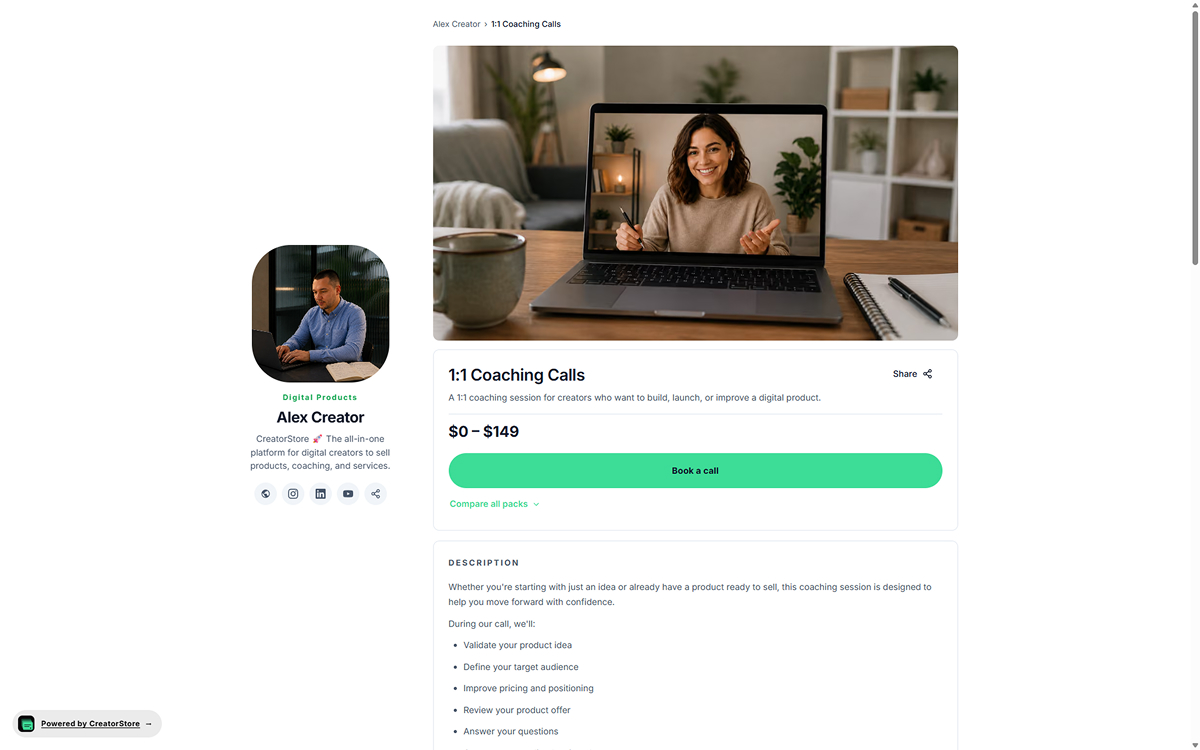
Any product type. Its own landing page.
Pick the format that fits the offer. The landing page inherits that type's checkout, delivery, and buyer flow — no reconfiguration required.
Digital product
Promote a template, guide, preset pack, or another digital product. Files are delivered automatically after payment.
See digital products →Custom product
Audit special, custom design promo, ghostwriting sprint — scoped work with deposits or installments on its own URL.
See custom products →1:1 call
A discovery call promo, a limited-time strategy session — bookable with Google Meet, payment upfront.
See coaching calls →Session pack
Promote a coaching or mentorship package on a focused page with the offer details in one place.
See coaching packages →Webinar
Live workshop registration, launch event with limited seats, expert masterclass — schedule, seat limits, join link.
See webinars →Bundle
A launch bundle at a discount, a Black Friday all-in-one, a course + workbook + call combo — one purchase.
See bundles →Service booking
Photo sessions, consulting hours, workshops with time selection. Custom brief, deposit, calendar built in.
See service booking →Link block
Redirect promo — send a landing page URL to any external destination (waitlist form, Notion doc, YouTube).
See links block →How your landing page looks — from parameters to public page
Every landing page opens as a full standalone page on its own URL — no sidebar, no other products competing for the click, no navigation back to your main store. Just the offer.
One creator, several landing pages — each on its own URL
Every landing page is its own object — its own cover, its own title, its own price, its own URL. Run a Digital product promo, a launch webinar, and a coaching offer at the same time — three separate landing pages, three separate URLs, three separate view counters. Same design, same checkout, same Analytics dashboard. Nothing shared with the main store except brand and payments.
- Each page is a self-contained standalone URL
- Same design tokens (colors, fonts, buttons) as your main store
- Same checkout flow, same payment providers
- Analytics tracks each landing page as a separate URL
- Mobile-optimized by default — no separate mobile design step
One product. One page. One CTA above the fold.
Buyers land on a page built for one thing — buying that product. Cover image, title, subtitle, price, and a big CTA above the fold. Full description, testimonials, guarantee, and FAQ below. The page has its own URL and can be crawled and considered for indexing by search engines. Ad traffic hits a focused page — no side-bar competition, no scroll-past distractions, no "browse other products" temptation.
- Own URL — /product/[slug] — a separate public page
- No links back to your main store or product grid
- Same checkout, delivery, and payment flow as your store
- Use your connected custom domain when it is available on your plan
- Own preview + own view counter — track each page separately
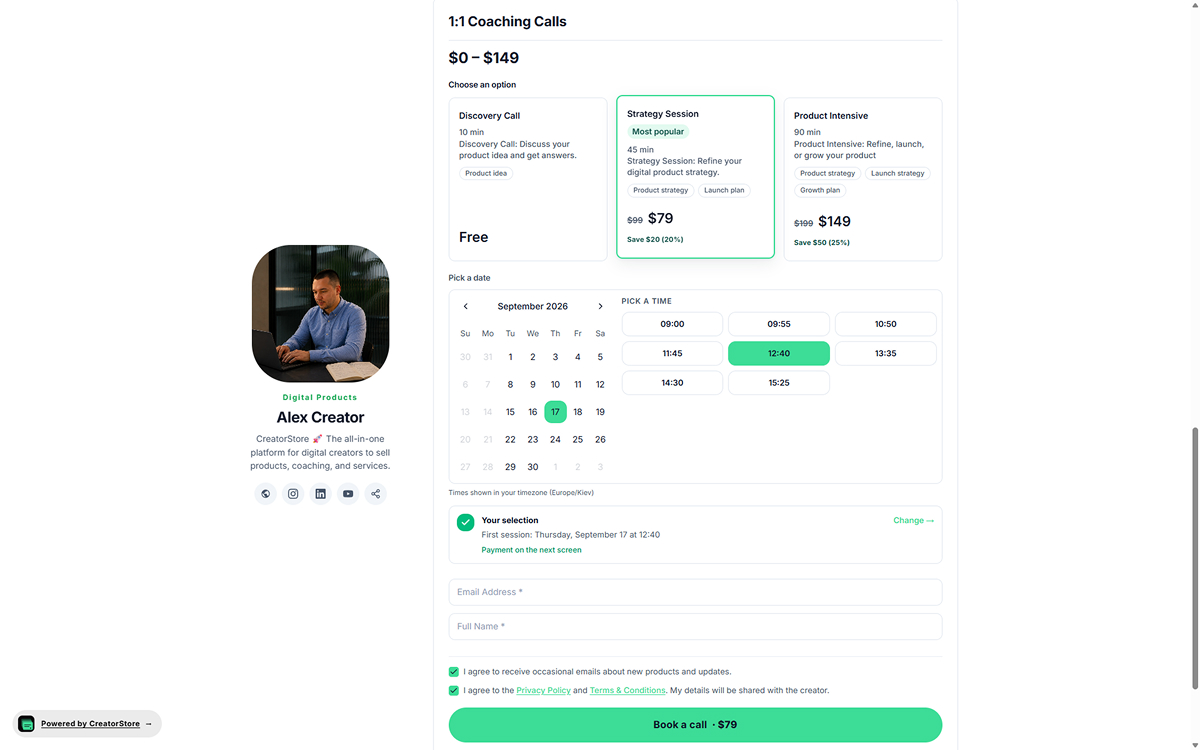
Pick a product type, edit content, publish
This is where the standalone page gets built. Click + Add Landing Page, pick the offer type you need. The page uses that type's built-in template — no separate builder tool, no code, no duplicating product data. Edit title, description, price, cover image, delivery details. The live preview panel on the right shows exactly what buyers will see. Hit Publish — landing page is live at /product/[slug].
- Add / edit / duplicate / unpublish from one dashboard
- Live preview panel — see the page as buyers will
- Editable URL — /product/spring-audit-special
- Same design as your store — colors, fonts, buttons inherit
- Own view counter next to each page in the list
No card required · 14-day free trial · 0% platform commission
Every landing page — its own URL, its own analytics, its own on/off switch
Landing pages are separate objects from your main store — with their own URL, own visibility state, own view counter. Nothing is shared except your store's design and payments setup.
Own URL per page
Each landing page gets its own URL — /product/[your-slug]. Share it on ads, in newsletters, in DMs. Nothing else on your store points at it.
Live preview panel
Pick any landing page in the dashboard, preview loads on the right. See exactly what buyers see before you publish.
Publish / unpublish anytime
Roll off a promo without deleting the page. Unpublish sends the URL to a 404 — republish restores it instantly, same URL.
Per-page view counter
Each landing page shows its own view count in the dashboard list. Quick sanity check on whether your ad is landing traffic before diving into Analytics.
Separate from widgets
Landing pages don't show on your main store's product grid, widget page, or navigation. Explicitly separate — no accidental cross-pollution.
Same design as store
Landing pages inherit your store's colors, fonts, and buttons. Consistent brand — different visibility.
Landing pages with checkout and analytics in one place
Landing pages that share your product data, checkout, and analytics — instead of a separate builder you have to sync manually.
- ✕Separate landing page builder
- ✕Your store on a different platform
- ✕Copy-paste product data + automation glue to sync buyers
- ✕Separate analytics tool
- ✕A spreadsheet to figure out which ad worked
- ✓Landing pages share your store's products
- ✓Same checkout, same buyers, same dashboard
- ✓Analytics per landing page URL built in
- ✓Traffic-source data available in Analytics
- ✓One attribution view — no spreadsheets
How to create a landing page in CreatorStore
Every landing page on CreatorStore follows the same short path: pick a product type, edit the content, publish. The page uses the same checkout, payments, and delivery flow as your main store — no separate builder, no third-party sync, no duplicated product data. Own URL, own analytics, own on/off switch. Nothing shows on your main store's widgets or navigation unless you choose to add it.
The pieces you'd normally piece together — a landing page builder subscription, a store on a second platform, an automation tool to sync buyers, separate analytics — all built into one product. Full walkthrough on how to explore every feature if you want it.
Why a landing page beats your main store for ads and launches
Your main store is optimized for browse. Someone lands, they see six products, they scroll, they pick. That's a good experience for organic traffic and for buyers who already know your work. It's a terrible experience for a paid ad or a launch — where you want the visitor focused on one offer.
A focused landing page keeps the offer and CTA in one place. Each campaign can use its own URL, making page and traffic performance easier to review in Analytics.
Landing pages vs. product pages vs. main store
Main store: your full storefront at creatorstore.co/@yourname. Browse-optimized. Every product listed. Best for organic traffic, referrals, existing audience.
Product page: individual product detail page inside your main store. Buyers reach it by clicking from the storefront. Good for depth, weaker for cold traffic.
Landing page: standalone URL, no sidebar, no cross-links. Built for paid ads, DMs, cold email, newsletters. One product, one page, one CTA. Best for launches, promos, and campaign attribution.
Who uses landing pages the most
Creators promoting a single digital product through Instagram, TikTok, email, or other channels. Coaches promoting a focused offer to their audience. Founders launching waitlists before a product is ready. Anyone doing a Black Friday or a birthday promo on one specific bundle.
The common trait: paid traffic, cold audience, or a limited-time offer. If you're spending on ads or writing a launch email, the landing page is the destination — not your main store.
From first landing page to a full campaign
To create a landing page: pick a product type, edit content, publish. Your first page can be live before your first ad campaign is even approved. Run one ad to the landing page URL, watch the view counter, check Top Pages in Analytics to see attribution.
Create separate landing pages for different promos, campaigns, or offers. Roll pages on and off as campaigns come and go — Unpublish keeps the URL reserved, Republish flips it back.
Landing page builder FAQ
Anything else? Contact us.
What product types work as landing pages?
Do landing pages show on my main store?
Can I unpublish a landing page temporarily?
Do landing pages have their own analytics?
Can I customize the URL slug?
How many landing pages can I create?
Can I use my custom domain for landing pages?
Do landing pages share the same design as my store?
Do I pay extra to use the landing page builder?
Launch your first landing page today.
Pick a product type, publish, share the URL — track every visitor from ad to purchase. Same checkout, same payments, same analytics as your main store.