
Coaching packages — session packs, credit tracking, expiry alerts.
Bundle coaching or consulting sessions into one package that clients pay for up front. Credit tracking, expiry alerts and tier availability are built in. 0% commission.
- Multiple pack tiers with pricing and availability for each tier
- Credit tracking and expiry alerts without manual spreadsheets
- Card payments at checkout
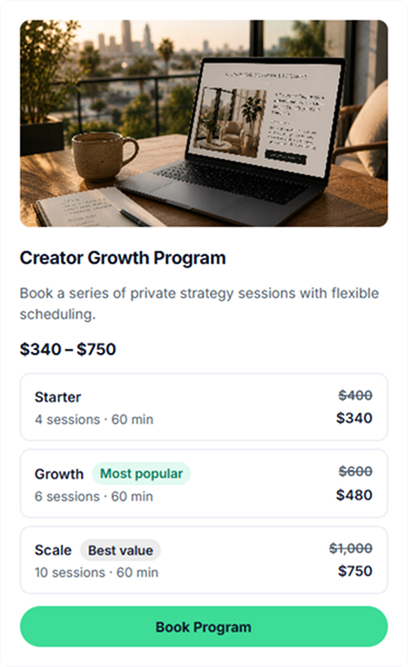
Which types of session packs can you configure?
Offer recurring coaching or consulting engagements for a fixed price up front. Clients can choose a pack and pay once at checkout.
Coaching pack
Bundle coaching calls into a pack with your own pricing. Career, business and life coaching can all be offered as 1:1 sessions.
Mentorship pack
Offer ongoing mentorship as a session pack with a schedule that fits your program. Useful for founder mentoring and creator programs.
Service pack
Bundle repeatable service work such as portfolio reviews, code audits or marketing check-ins, with clear deliverables.
Intro pack
Offer an introductory pack at a lower per-session rate. It can help new clients try your service before choosing a deeper package.
Fitness pack
Bundle training or nutrition check-ins for personal training and wellness coaching.
Workshop pack
Bundle live workshop sessions around a topic such as writing, design or product strategy.
Language pack
Bundle language lessons at a fixed rate for English, Spanish or other tutoring offers.
Retainer pack
Bundle recurring consulting work with priority booking and clear deliverables instead of hourly billing.
How to configure a session pack
Add the required product details, checkout settings and pack options. You can also customize SEO settings and the confirmation email.
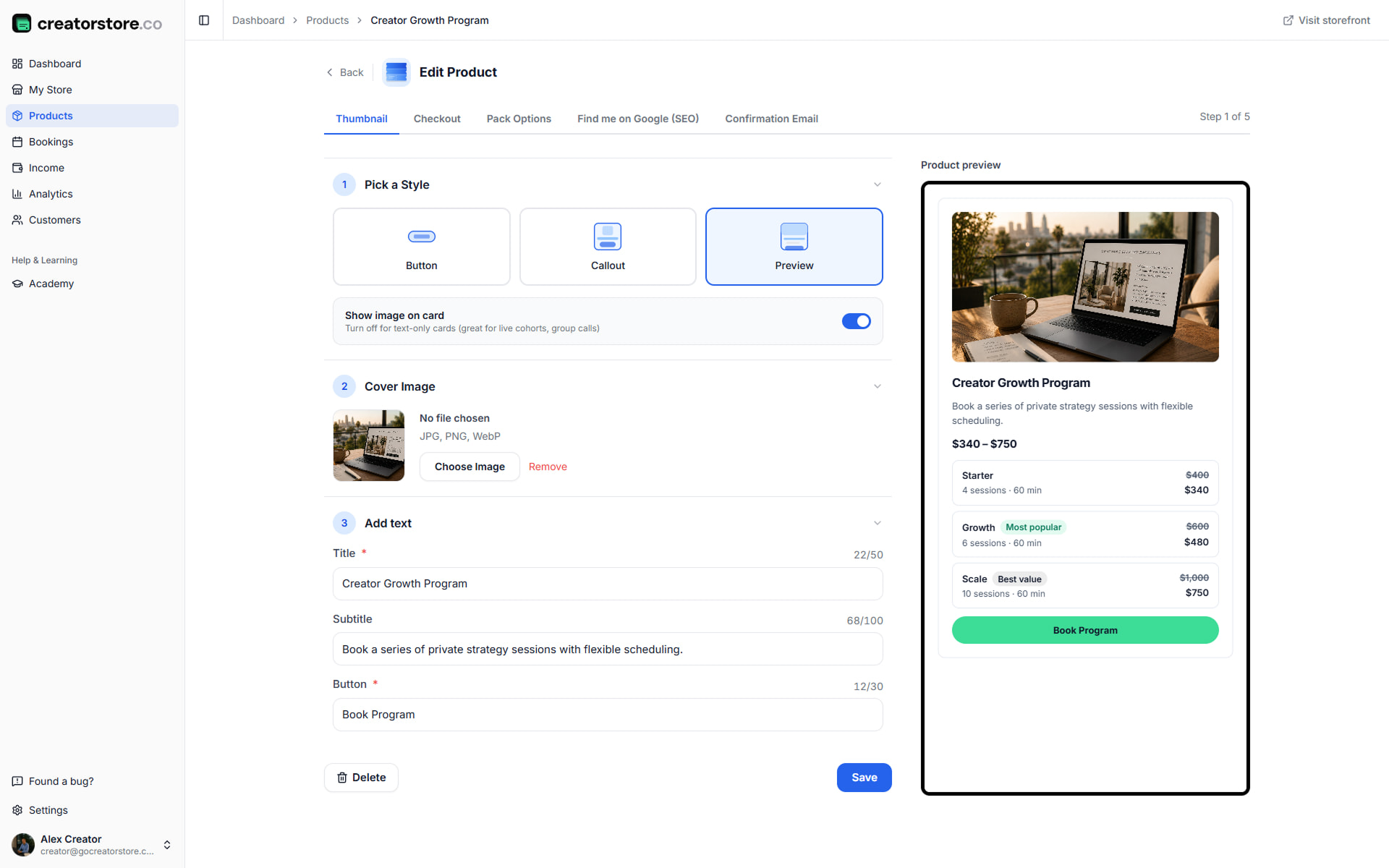
Choose how your coaching program shows up
Choose a card layout for your coaching program. Upload a cover image, add a title and subtitle, and set the button text. The live preview updates as you edit.
- Different card layouts with a "Show image on card" option
- Live storefront preview updates as you type
- Character counters for title/subtitle
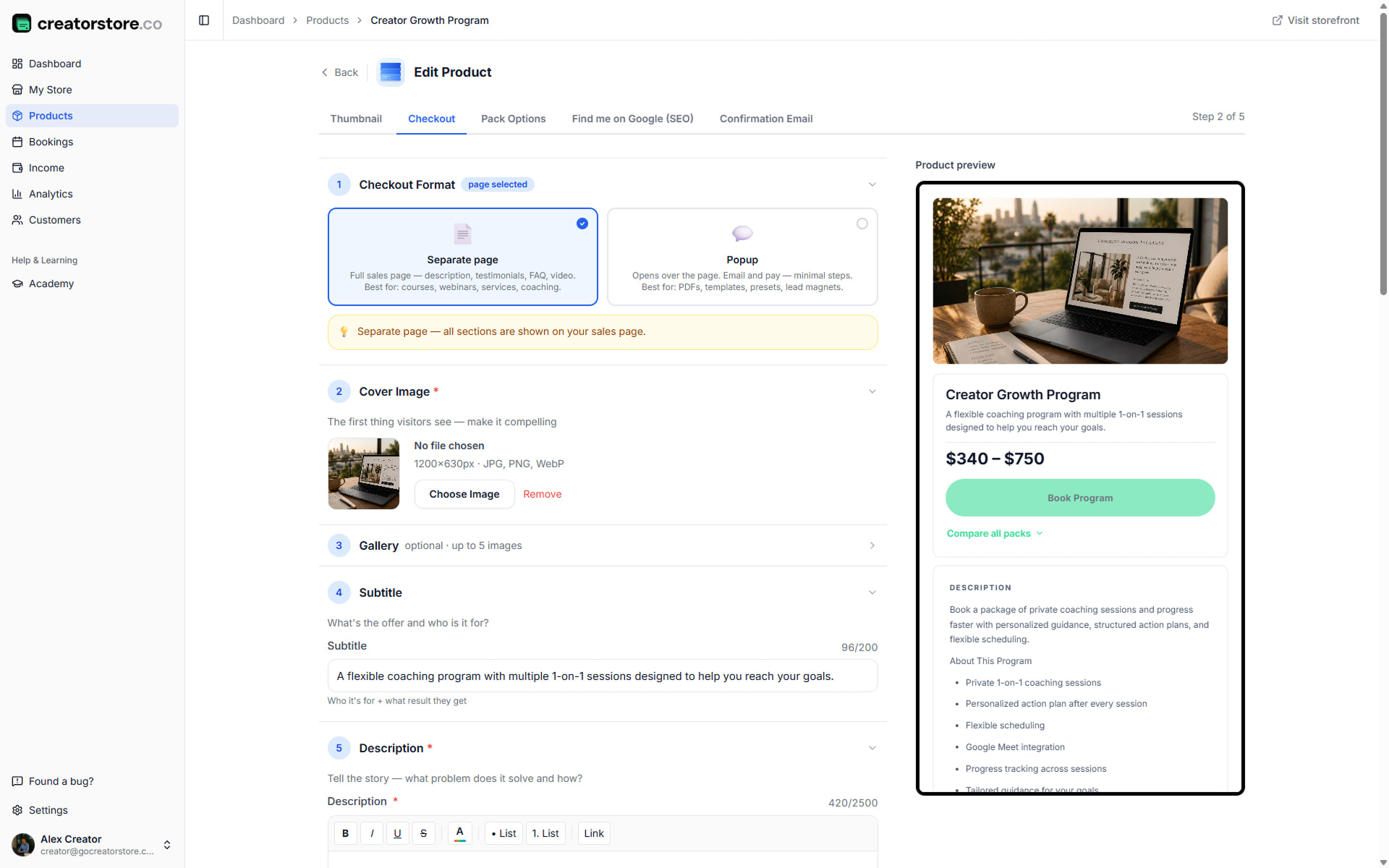
Build the sales page for your coaching program
Add the cover image, gallery, subtitle and rich-text description for your program. You can also add a video, guarantee block, testimonials, FAQ content and custom intake fields.
- Separate page or popup checkout format
- "About This Program" + "Perfect For" content blocks
- Testimonials with photo or initials and ratings
- Program FAQ for schedule, cancellation, scope and pace
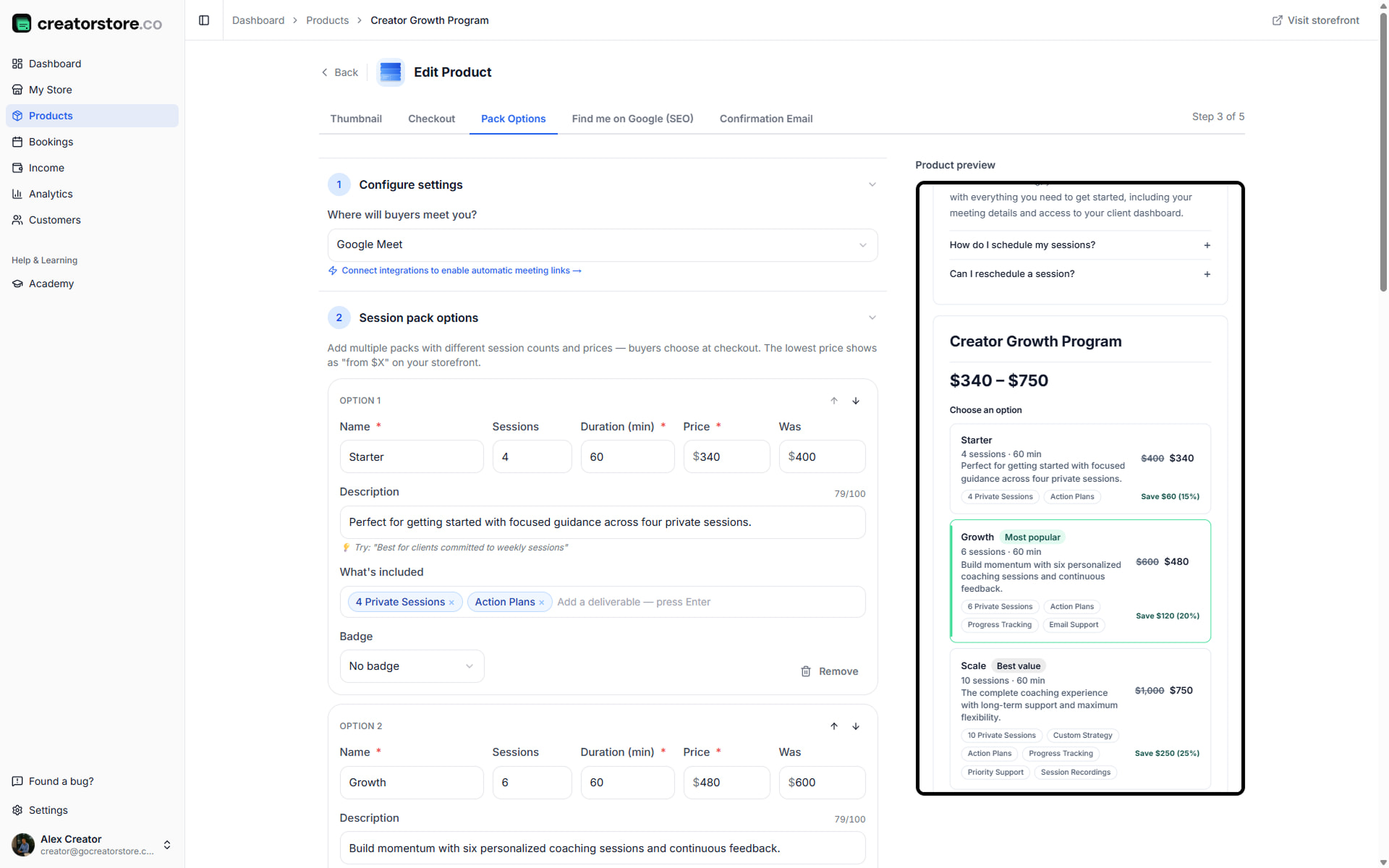
Set up pack tiers, prices, and validity
Add multiple pack tiers to the same product. Set the sessions included, session duration and price for each tier. You can also add a previous price for a discounted offer, set a validity period, and configure weekly availability with day-off overrides. Once you save this step, clients can book packs.
- Multiple pack tiers with sessions/duration/price per tier
- Optional badges: "Most popular", "Best value"
- Validity period per tier, with an unlimited option
- Weekly availability + single-day and date-range overrides
- Google Meet auto-links, or plug in your own conferencing
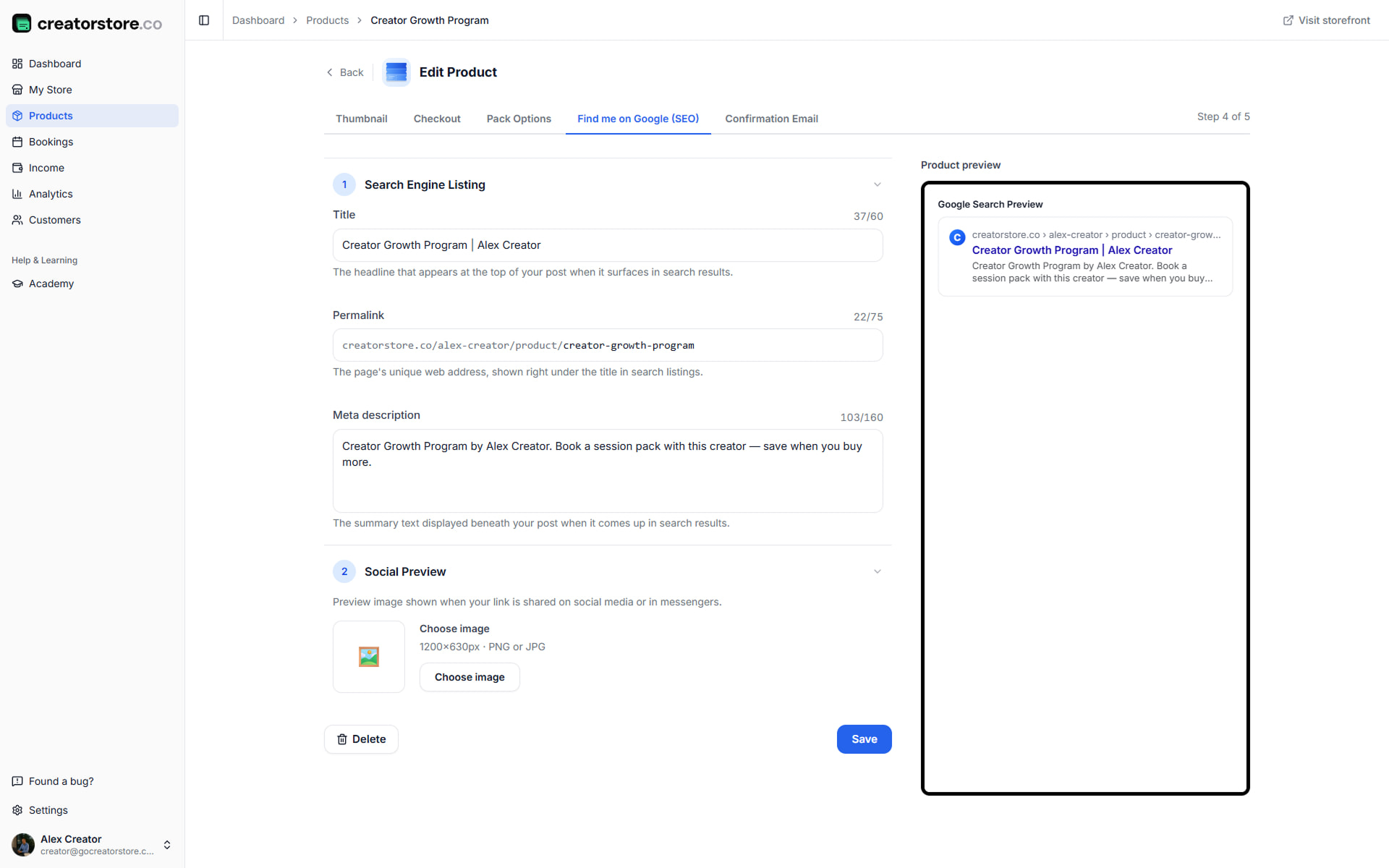
Get your coaching program found on Google
Add a meta title, permalink and description with a live Google search preview. You can also set a social image and preview how the page may appear when shared.
- Live Google snippet preview
- Social image with a preview for common social platforms
- Auto-generated permalink from title
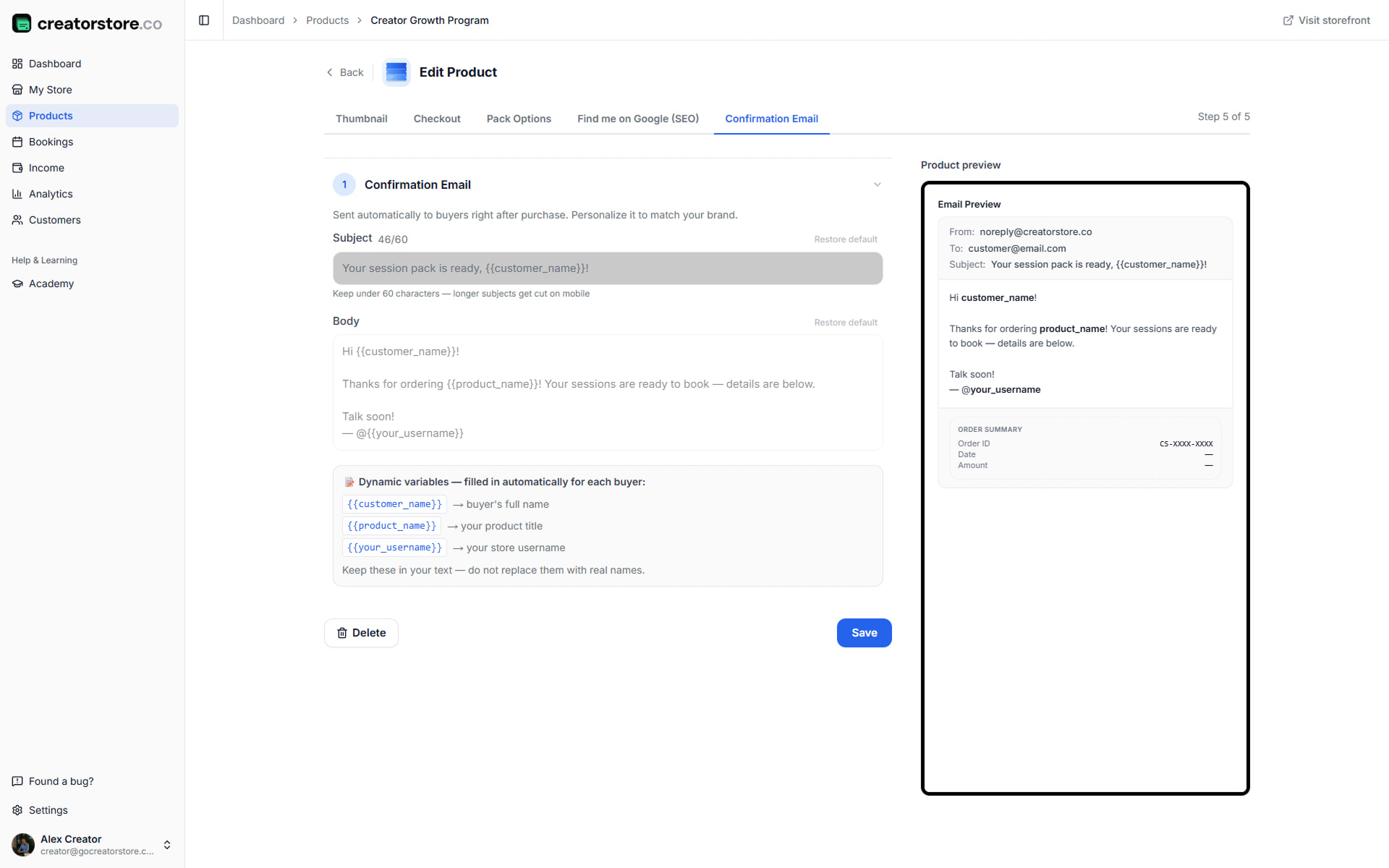
Personalize the program confirmation
The default email includes the pack details, credit balance and booking information automatically. You can edit the subject and body and use dynamic variables for customer and product details. A live email preview and order summary are included.
- Dynamic variables for booking details
- Live email preview with Order Summary
- Credit balance and validity dates auto-included
current trial offer (see Pricing for terms) · A payment card may be required; see current pricing · Start accepting pack bookings from your store
How the session pack flow works — from purchase to last session
Client buys a pack and the included credits are added to their account. Each booking uses the required credit. After the session, you can mark it complete and the balance updates automatically.
Client buys the pack
Chooses a tier and pays once at checkout. The included credits are added to their account.
Client books each session as they go
Uses available credits to book a call from the calendar. No new payment is required for the booked session.
You show up and deliver
Google Meet links can be generated automatically, or you can use your own conferencing link. Manage the meeting from your dashboard and keep notes for the client.
Track credits, expire, or upsell
Credit balances update automatically. Expiry alerts can notify clients before validity ends, and follow-up messages can support the next offer.
Configure trial packs or deep mentorship packs
Offer an introductory pack and a deeper package, with pricing and terms that fit your coaching program.
Intro pack — hook new buyers
An introductory pack can use a lower per-session rate. Clients can try the format before choosing a deeper package.
- ✓Introductory pack at a discount
- ✓Credit tracking + validity per pack
- ✓Upsell to a bigger pack via follow-up email
Set your own price for each pack
Set your own price for each pack. Your payment provider handles the payment, and clients pay at checkout.
- ✓0% platform commission
- ✓Multi-currency support
- ✓Refund policy pulled from your Terms
How session packs actually work under the hood
Every coaching package on CreatorStore follows the same flow: bundle sessions into tiers, set the price and validity, then publish. The client chooses a tier and pays once. Credits are added to their account and used as they book sessions. You deliver the sessions and manage their status from your store.
The tools you may otherwise manage separately — scheduling, payment links, credit tracking and expiry reminders — are available in the same product. See the guide on how to sell coaching online for more.
Why creators sell packages instead of one-off sessions
One-off sessions are useful for clients who want a single call. Packages let clients commit to multiple sessions and pay up front, while you manage the remaining credits in the store.
With a package, clients commit to multiple sessions in advance instead of booking each session separately. This can make ongoing coaching easier to organize for both sides.
Packages vs. subscriptions vs. one-off calls
Packages: a defined number of sessions that the buyer can schedule according to your availability and package terms.
Subscriptions: recurring payments for ongoing services, with access and usage based on the terms you set.
One-off calls: a single session with a single payment. Useful for discovery calls, occasional consulting or clients who do not need a package.
Who does well selling coaching packages
Career coaches, business and product strategists, fitness and wellness coaches, executive coaches, language tutors, founder mentors and health or nutrition coaches can all use session packs when their work benefits from ongoing sessions.
The common trait: work that benefits from repetition. If your clients get better results across multiple sessions — packs work. Single-session buyers should stay on 1:1 Calls.
From first pack to steady sales — how long it really takes
If you already sell 1:1 calls, a session pack can be a natural way to offer ongoing work. Start by packaging a service you already provide, set the price and terms, then publish it in your store.
Results and sales depend on your offer, audience and marketing. CreatorStore provides the tools to package, sell and manage coaching sessions, but it does not guarantee a specific level of revenue or a timeline.
Coaching packages, answered.
Have another question? Reach out and we can help.
How do credits work in coaching packages?
Can I set an expiry date on coaching packs?
Can clients reschedule pack sessions themselves?
What about no-shows on pack sessions?
Can I sell packs and 1:1 calls on the same store?
How do refunds work for coaching packs?
Do I pay extra to sell coaching packages?
How much can coaches earn selling packages?
How should I price a coaching pack?
What niches work well for coaching packages?
Sell coaching packages.
Track sessions in your store.
0% commission. Credit tracking, expiry alerts and calendar tools are built into your store.