
Sell digital products and consulting — on your own domain.
Connect yourname.com or store.yourname.com to your CreatorStore. Any registrar (Namecheap, GoDaddy, Cloudflare, Squarespace). Auto HTTPS. About 5 minutes of hands-on setup.
- Root domain (yourname.com) or subdomain (store.yourname.com)
- Auto HTTPS — SSL certificate provisioned automatically
- You own the domain forever — portable if you ever migrate
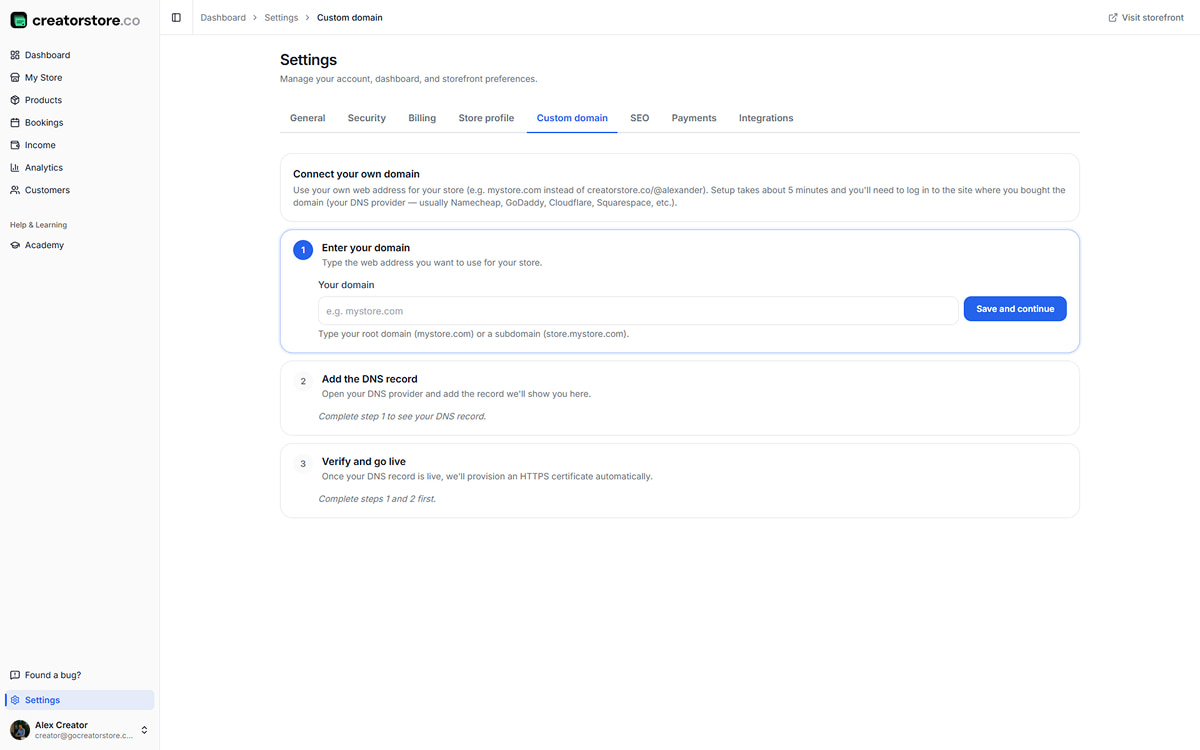
Everything included with a custom domain.
SSL certificates, subdomain support, DNS instructions — no third-party services, no manual certificate uploads, no separate hosting.
Root domain
Connect yourname.com at the apex level. No prefix required. Shortest possible URL — the one you say out loud.
Subdomain
store.yourname.com, shop.yourname.com, learn.yourname.com — any subdomain works. Ideal if your main site is on the root.
Auto HTTPS
SSL certificate provisioned automatically after DNS verification. No manual upload, no yearly renewal. Padlock stays.
Any DNS provider
Namecheap, GoDaddy, Cloudflare, Squarespace — or wherever you bought the domain. Same setup everywhere.
5-minute setup
Enter your domain, copy the DNS record, click verify. No code, no support ticket, no waiting on tech.
Portable forever
You own the domain at your registrar, not us. Point it elsewhere anytime. Migrate without losing your URL.
SEO equity you own
Google indexes your store under yourname.com. Rankings, backlinks, authority — they build on your domain, not someone else's URL.
Email alignment
[email protected] pairs with a store on yourname.com. Consistent brand from cold outreach to checkout.
How to connect a custom domain to your creator store
Two screens inside the dashboard — enter the domain, then wait a couple minutes while DNS propagates and HTTPS provisions itself.
Enter yourname.com in the dashboard
Settings → Custom domain → type your address. Root (yourname.com) or subdomain (store.yourname.com) — both work. CreatorStore shows the exact DNS record you need to paste into your registrar. Copy it, open Namecheap/GoDaddy/Cloudflare in a new tab, paste it in, save.
- Root and subdomain — both included
- Exact DNS record shown per registrar
- Any registrar works — buy from wherever you already have an account
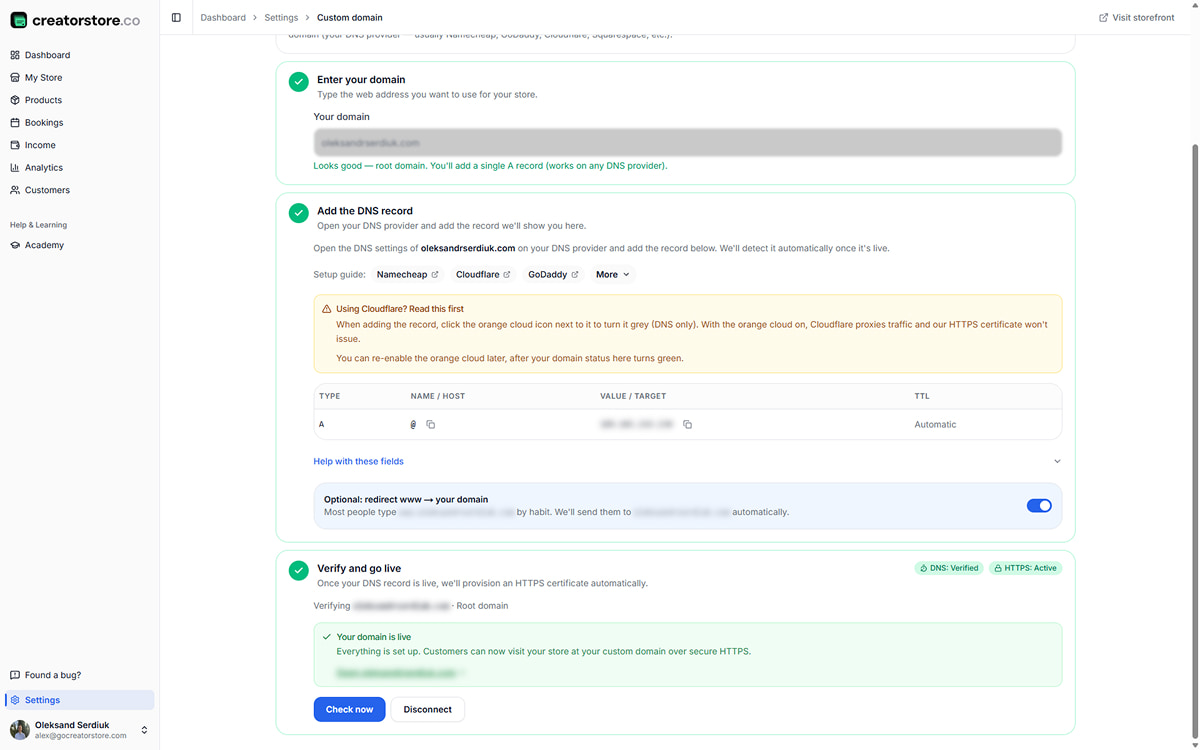
Domain connects in a couple minutes
Once you save the DNS record at your registrar, CreatorStore checks continuously. Usually 5–30 minutes for propagation — sometimes almost instant, occasionally up to a few hours depending on your DNS provider. HTTPS certificate provisions automatically the second DNS verifies. Store goes live at yourname.com without another click from you.
- DNS propagation — typically 5–30 minutes
- HTTPS certificate — auto-provisioned, no upload
- Continuous check — you don't refresh anything
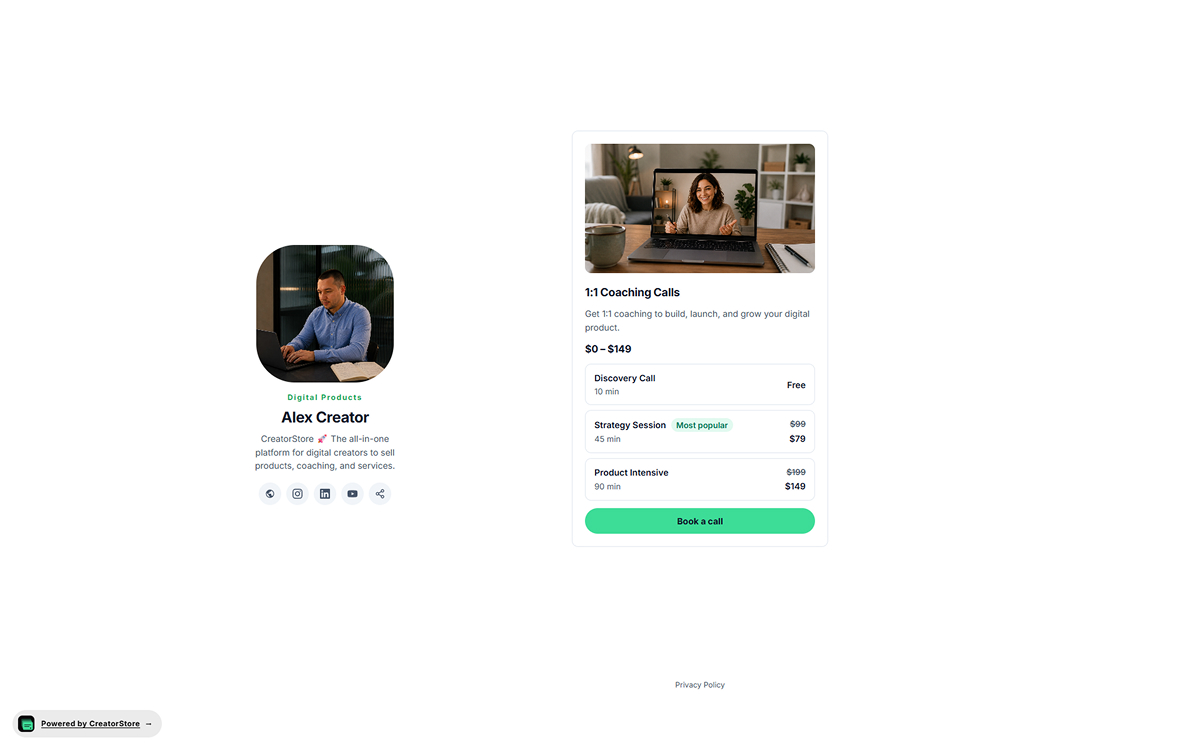
Your store is now available at yourname.com
DNS is verified, HTTPS is provisioned, the store loads at your own address. Everything looks and works the same — products, sales pages, checkout, dashboard. Only the URL bar is different: yourname.com with the padlock, ready to share with customers, put on a business card, or send to a podcast guest.
- Store loads at yourname.com — no redirect, no interstitial
- Padlock in the URL bar — HTTPS active automatically
- Ready to share on socials, cards, and cold outreach
Pro plan · Root or subdomain · Auto HTTPS · Same 5-minute setup on any registrar
From buying a domain to a live store in one afternoon
Enter the address, add one DNS record, verify. HTTPS is automatic.
Buy a domain at any registrar
Namecheap, GoDaddy, Cloudflare, Squarespace. About $10–15/year. Skip this step if you already own one.
Type it into the dashboard
Settings → Custom domain → yourname.com or store.yourname.com. Save.
Add the DNS record at your registrar
CreatorStore shows the exact record. Log into your registrar, paste it, save.
Verify and go live
Click Verify. Once DNS propagates, HTTPS provisions automatically. Store loads at yourname.com.
Start on a free URL. Grow into your own address.
You don't need a custom domain on day one. Start free, upgrade when the store starts closing real business.
Free CreatorStore URL — day one
creatorstore.co/@you — live from the first click. Perfect for getting to your first sale without buying anything.
- ✓Included on every plan — Free, Starter, Pro
- ✓HTTPS included — same padlock as a custom domain
- ✓Upgrade to a custom domain anytime later
Custom domain — yours forever
yourname.com or store.yourname.com. Fully your web address. SEO equity, business-card material, portable if you migrate.
- ✓Included on the Pro plan and higher
- ✓Root and subdomain both included
- ✓You own the domain at the registrar — take it anywhere
Selling on your own domain — why the URL bar matters
A custom domain replaces the default CreatorStore URL (creatorstore.co/@you) with your own web address — yourname.com or store.yourname.com. Store content, products, checkout, and dashboard stay exactly the same. Only the address changes. You buy the domain from any registrar you already use and point it at CreatorStore via one DNS record.
The URL bar is the first line of your pitch. yourname.com reads as a real business — a shared platform URL reads as a tenant. When you're closing a $10K retainer, sending a link to a podcast guest, or handing a card to a conference lead, you want the address to work for you, not just point to you. CreatorStore auto-provisions the HTTPS certificate the moment DNS verifies — no manual SSL, no yearly renewals, no expired-cert warnings breaking checkout.
Root domain vs. subdomain — which to pick
Root (yourname.com): shortest, most memorable, cleanest to say out loud. Pick this if CreatorStore is the primary destination for your business — no separate main site.
Subdomain (store.yourname.com): works when you already have a main site on the root. Common: yourname.com is your portfolio or company site, store.yourname.com is where clients buy. Same SEO equity, one extra level in the URL.
Why SEO equity matters — the migration test
If Google indexes your store under a shared platform URL (someplatform.com/@you), every backlink you earn and every ranking you build is tied to that platform's URL. Switch platforms — you lose the URL, and every link pointing to it breaks. Every ranked page has to be re-earned.
A custom domain flips that. Google indexes yourname.com, backlinks point at yourname.com, rankings live on yourname.com. If you ever migrate — from CreatorStore or to CreatorStore — the domain comes with you. Rankings, backlinks, authority stay intact. You own the equity, not the platform.
HTTPS, expired certificates, and why "auto" matters
Traditional custom-domain setups need you to renew SSL certificates every year. Miss the renewal — buyers see a "not secure" warning in the URL bar, and checkout breaks. Every SaaS forum has a thread about it.
CreatorStore auto-provisions and auto-renews the HTTPS certificate. Set it once, forget it. The padlock stays in the URL bar without you touching anything. No calendar reminder, no ops task, no dropped sales because a cert expired at 2am on a Saturday.
Portability — you own the domain, we just read it
The domain lives at your registrar (Namecheap, GoDaddy, Cloudflare). CreatorStore never owns it, never has admin over it, never can hold it hostage. You added a DNS record pointing at us — you can point it elsewhere the same way, in 5 minutes, whenever you want.
That's the point. Own your audience, own your list, own your URL. The platform is a rental. The domain is the deed.
Custom domain questions & answers
Anything else? Reach out — we reply within 24 hours.
What plan do I need for a custom domain?
Do I buy the domain from CreatorStore?
Can I use a subdomain like store.mysite.com?
How long does DNS propagation take?
Is HTTPS included with a custom domain?
What if my domain is already used for another website?
Can I switch domains later?
What happens to my SEO when I connect a custom domain?
Can I connect multiple domains to one store?
Do I need any technical skills to set up a custom domain?
Your store.
Your own domain.
Start free on your CreatorStore URL. Upgrade to Pro when you're ready to connect yourname.com — 5 minutes, auto HTTPS.