
Add a link block to your creator store
Group social profiles, music, podcasts, affiliate destinations, and contact links in one block. Choose a list, icon row, or grid layout and reorder links when needed.
- Add external URLs with titles and optional descriptions
- Choose a simple list, icon row, or grid layout
- Mark affiliate or sponsored links with an AD badge when disclosure is appropriate
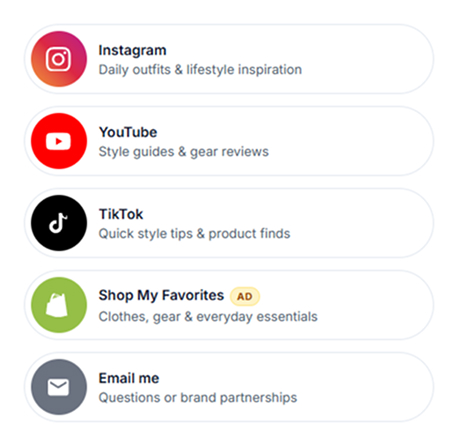
Choose how your links appear
Use the same set of links in a simple list, icon row, or grid and change the layout without adding the links again.
Simple list
Show links as full-width buttons with a title and clear destination.
Icon row
Place compact icons in a row for social profiles and other recognizable destinations.
Grid
Arrange links as cards in a grid for contacts, resources, or other grouped destinations.
Use link blocks for social profiles, content, and contacts
Create separate link groups for the destinations that matter to your audience.
Social bio links
Add links to Instagram, YouTube, TikTok, Threads, and other social profiles.
Music streaming
Add links to Spotify, Apple Music, SoundCloud, Bandcamp, and other music destinations.
Podcast platforms
Add links to Apple Podcasts, Spotify, Overcast, Pocket Casts, and other podcast platforms.
Affiliate & sponsored
Add an AD badge to affiliate or sponsored links to make the commercial relationship clearer to visitors.
Newsletter signups
Link to newsletter signup pages such as Beehiiv, Substack, Kit, or Mailchimp, or use CreatorStore email capture separately.
Quick contact card
Group email, phone, calendar, website, WhatsApp, Telegram, and other contact destinations.
Customize each link and reorder the block
Choose the layout, add link descriptions or icons where supported, mark sponsored links, and change the order of destinations.
Layout styles
Simple list = wide stacked buttons. Icon row = compact circular icons. Grid = 2-column cards. Same links, three visual moods — switch anytime and links survive the change.
Brand colors, automatic
When brand colors are available for a recognized platform, you can use them to make destinations easier to identify.
Affiliate & sponsored badges
Use the per-link AD badge to identify affiliate or sponsored destinations. The badge supports disclosure, but you remain responsible for meeting the rules that apply to your content and audience.
Subtitles per link
Add an optional short description below a link to explain what visitors will find after clicking.
Custom icon per link
Use available icons for different destinations and add a custom icon where the editor supports it.
Drag-to-reorder
Change the order of links in the editor without recreating the block.
Add and publish a link block
Choose a layout, add your destinations, adjust the link settings, and publish the page.
Pick Simple / Icon / Grid
Three layout styles. Switch later if you want — your links survive the change.
Paste URLs
For each link: URL, title, optional subtitle. Toggle AD badge for affiliate or sponsored. Drag to reorder.
Adjust link appearance
Use available icons, colors, descriptions, and disclosure settings for each destination.
Brand colors on or off
Toggle "Use brand colors" — Instagram gradient, YouTube red, Spotify green auto-applied. Or override per link with a custom icon.
Live on store
Publish the page so visitors can use the links from your storefront.
What is a link block?
A link block is a section of your CreatorStore page for external destinations such as social profiles, music, podcasts, partner pages, or contact links. It is different from the full Link in Bio page, which can also include products, bookings, email capture, media, and other blocks.
Use one block for related destinations
Group links that belong together, such as social profiles, podcast platforms, music services, or contact options. This keeps the storefront easier to scan.
Choose the layout that fits the content
Use a simple list when titles matter, an icon row for recognizable destinations, or a grid when you want links displayed as separate cards.
Affiliate and sponsored links
CreatorStore can display an AD badge on a link. Use clear disclosures appropriate to the laws, platform policies, and advertising rules that apply to you; a badge by itself does not guarantee compliance.
Link block or media carousel?
Use a Link block for destinations visitors can open. Use the Media Carousel when the main purpose is to present a sequence of supported images, videos, or media items.
Link block FAQ
Common questions about adding and using a Link block.
What is a link block?
Which layouts can I use?
Can I change the order of links?
Can I mark affiliate or sponsored links?
Can I add descriptions or icons?
When should I use a Link block instead of a Media Carousel?
Is a Link block the same as a Link in Bio page?
Does CreatorStore branding appear on the page?
Add your links to CreatorStore
Group the destinations you want visitors to find and publish them as part of your storefront.
Choose a layout · Add links · Reorder · Publish