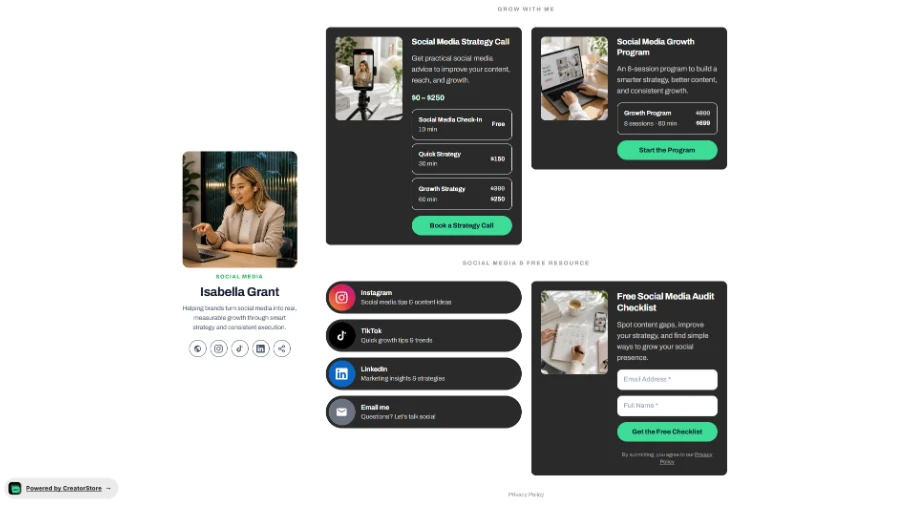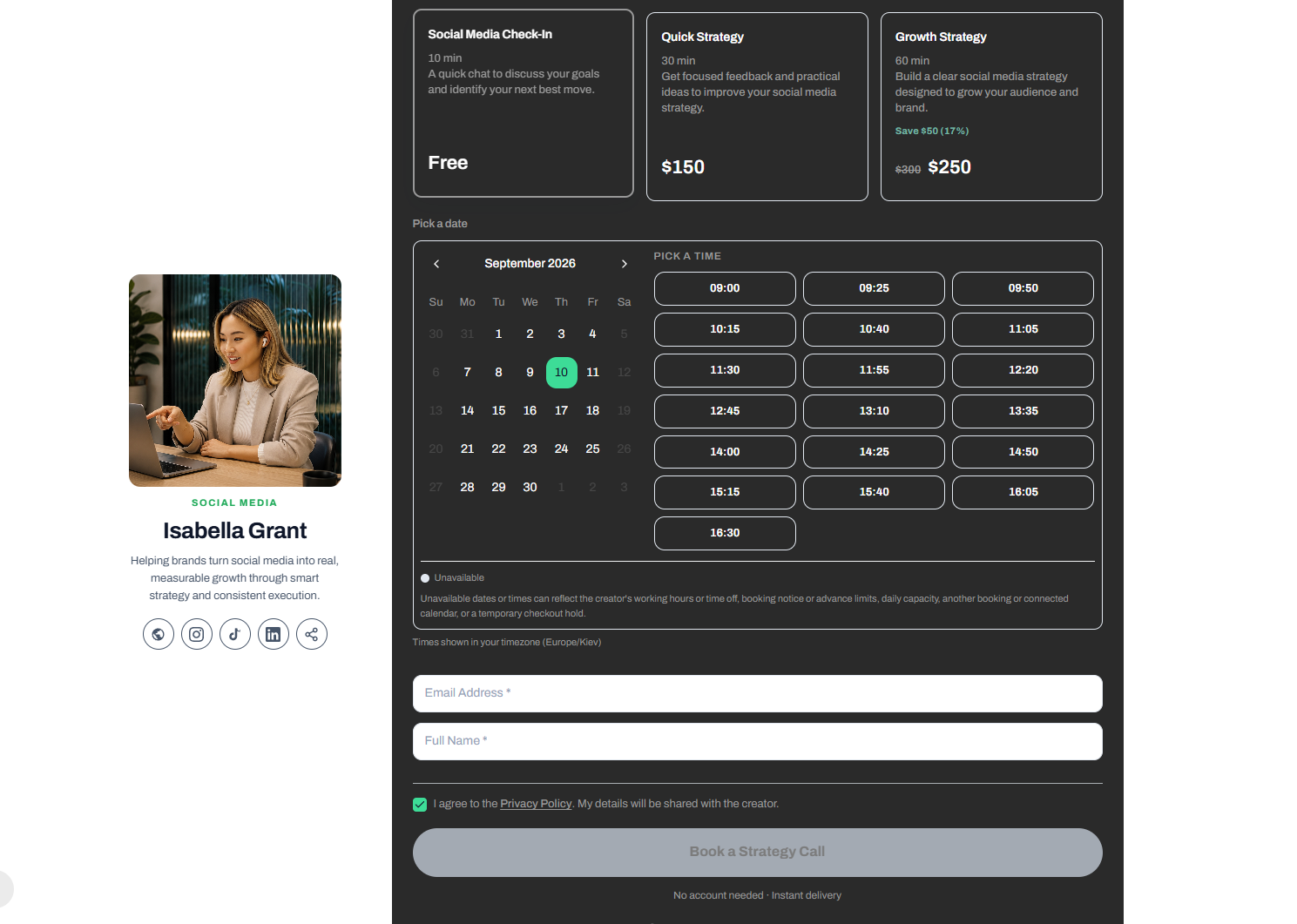
Once a client decides to book a 1:1 coaching call, everything has to just work: they pick a time, pay, and get a confirmation with the meeting link — without you touching a thing. That's what a proper booking setup does.
In this guide, you'll set up paid 1:1 coaching calls in Creator Store step by step: create the product, configure the checkout, define session types and prices, and automate confirmation emails. By the end, your booking page will be live and taking payments.
Step 1: Create Your Coaching Call Product — Choose Style and Add a Cover Image
The first step is to set up your coaching call as a product on Creator Store.
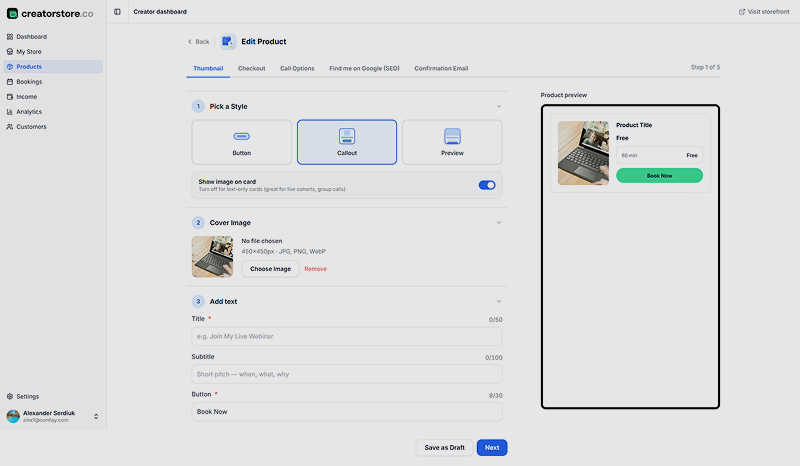
Pick a Style: You can choose from a button, callout card, or preview style for how your coaching call will appear on your storefront. The callout style is ideal for coaching calls because it shows an image, description, and booking button clearly.
Add a Cover Image: Upload a compelling image (recommended size is 450×450 pixels) that represents your coaching service and attracts attention.
Add Title, Subtitle, and Button Text: Use a clear title like "Personal Coaching Session," a short subtitle explaining the session, and a call-to-action button such as "Book Now" to encourage bookings.
Step 2: Configure the Checkout Page for a Smooth Booking Experience
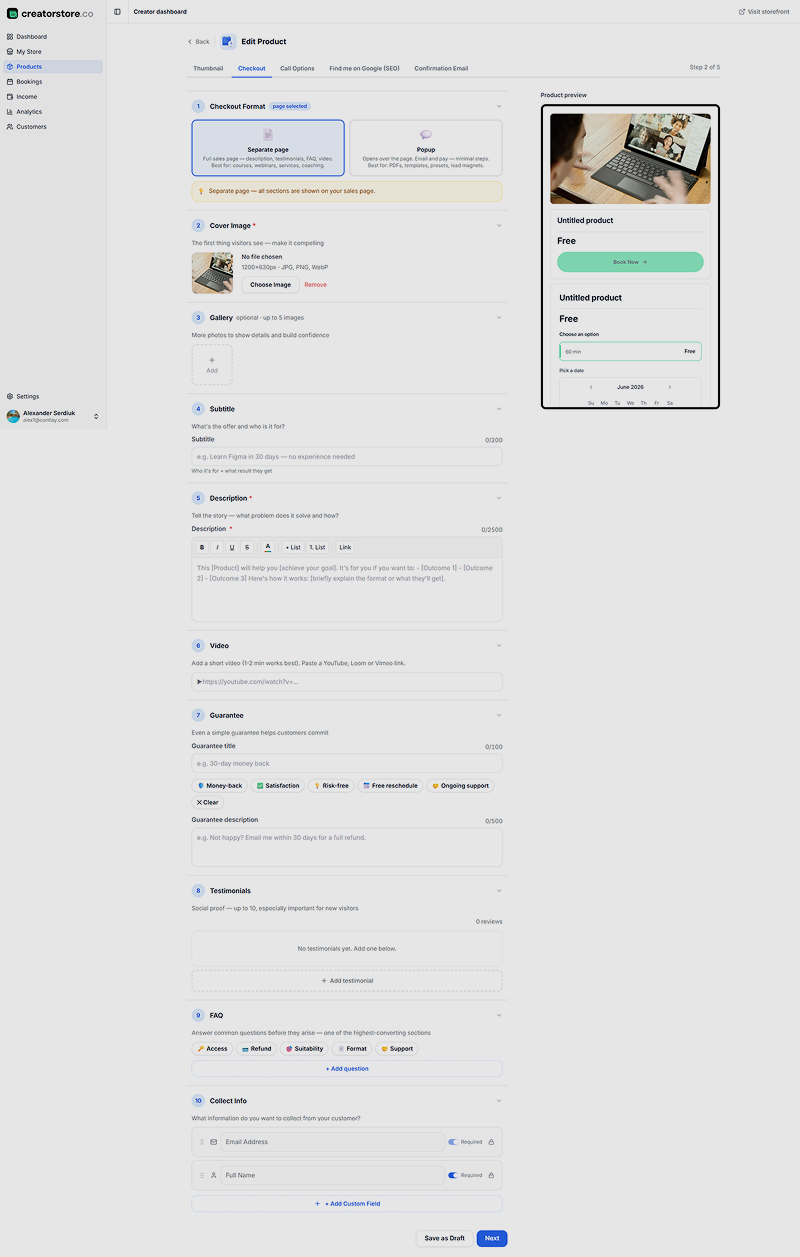
Your checkout page is where clients will finalize their booking and payment.
Checkout Format: Choose between a separate full page or a popup window for the checkout process. For coaching calls that require detailed information, a separate page typically works best.
Write a Detailed Description: Explain what problems your coaching call solves, what clients will gain, and how the session works. This helps build trust and set expectations.
Add a Video (Optional): Including a short (1-2 minute) video introduction or overview can increase conversions by adding a personal touch.
Set Guarantees: Offer guarantees such as money-back, satisfaction, risk-free trials, free rescheduling, or ongoing support to reduce buyer hesitation.
Add Testimonials: Social proof is powerful. Include client reviews to build credibility.
Answer FAQs: Address common questions upfront to reduce doubts and increase confidence.
Collect Client Information: Decide what information you want from clients during booking, like full name and email address, ensuring you can follow up effectively.
Step 3: Set Up Your Call Options — Define Session Types, Duration, and Pricing
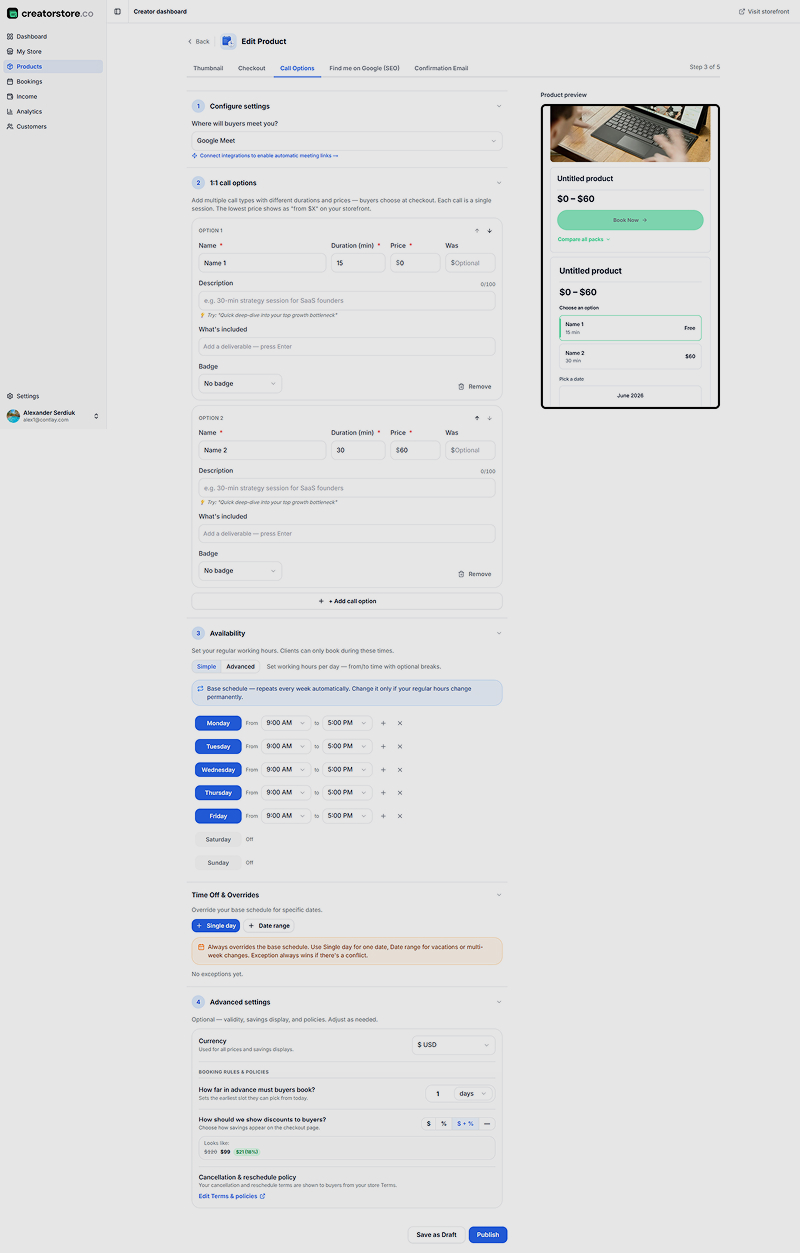
This step allows you to tailor your coaching calls to different client needs and prices.
Choose Meeting Platform: Select where you'll host calls, such as Google Meet or Zoom. You can integrate to generate automatic meeting links.
Add Multiple Call Options: Offer various session types, durations, and prices to give clients flexibility. For example:
- 15-minute quick call — free or introductory price
- 30-minute standard session — premium price
Describe Each Option: Clearly state what each session includes and any special features or bonuses.
Set Availability: Define your working hours and days clients can book. You can also set exceptions for holidays or time off.
Advanced Settings: Set currency, booking lead times (how far in advance clients can book), discount display, cancellation and rescheduling policies.
Step 4: Optimize for Search Engines (SEO) to Attract More Clients
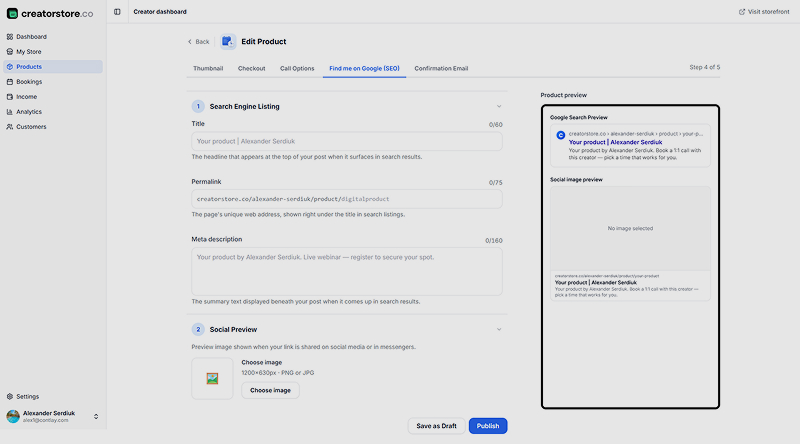
To make your coaching calls discoverable on Google and social media, fill in SEO details.
Search Engine Listing: Write a clear, keyword-rich title for the product page that will appear in search results.
Permalink: Customize the URL for easy sharing and better SEO.
Meta Description: Provide a concise summary that appears under your title in search results.
Social Preview Image: Upload an image that will show when your link is shared on social media platforms.
Example URL:
[https://creatorstore.co/@demo-store/coaching-call](https://creatorstore.co/@demo-store/coaching-call)
Step 5: Set Up Automated Confirmation Emails to Keep Clients Informed
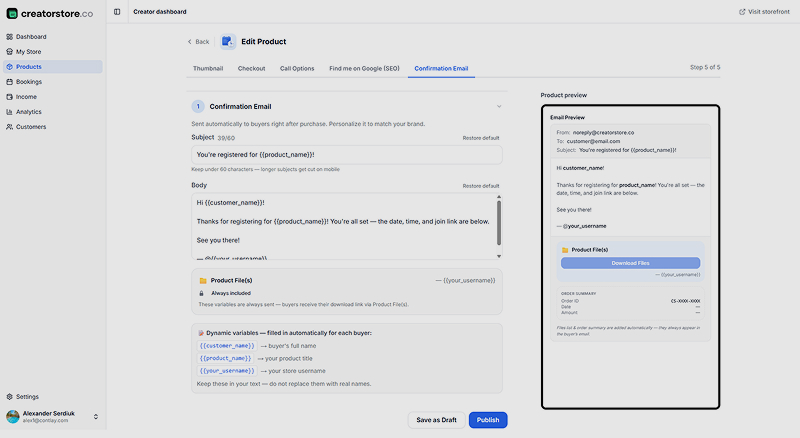
Good communication keeps clients happy and reduces no-shows.
Email Subject: Personalize with the product name, e.g., "You're registered for {{product_name}}!"
Email Body: Thank the client for booking, confirm the date and time, and include the join link for the session.
Use Dynamic Variables: Automatically personalize emails with client names and product details using placeholders like
{{customer_name}}and{{product_name}}.
Why Coaches Run Their Bookings on Creator Store?
User-Friendly Setup: No technical skills required—get started quickly.
Flexible Call Options: Customize session lengths and pricing to fit your business model.
Automated Scheduling & Reminders: Save time and reduce missed appointments.
SEO and Social Sharing Built-In: Reach a wider audience effortlessly.
Secure Payment Integration: Clients can pay safely during booking.
Convenient for Clients: Easy booking experience increases conversion rates.
Final Thoughts
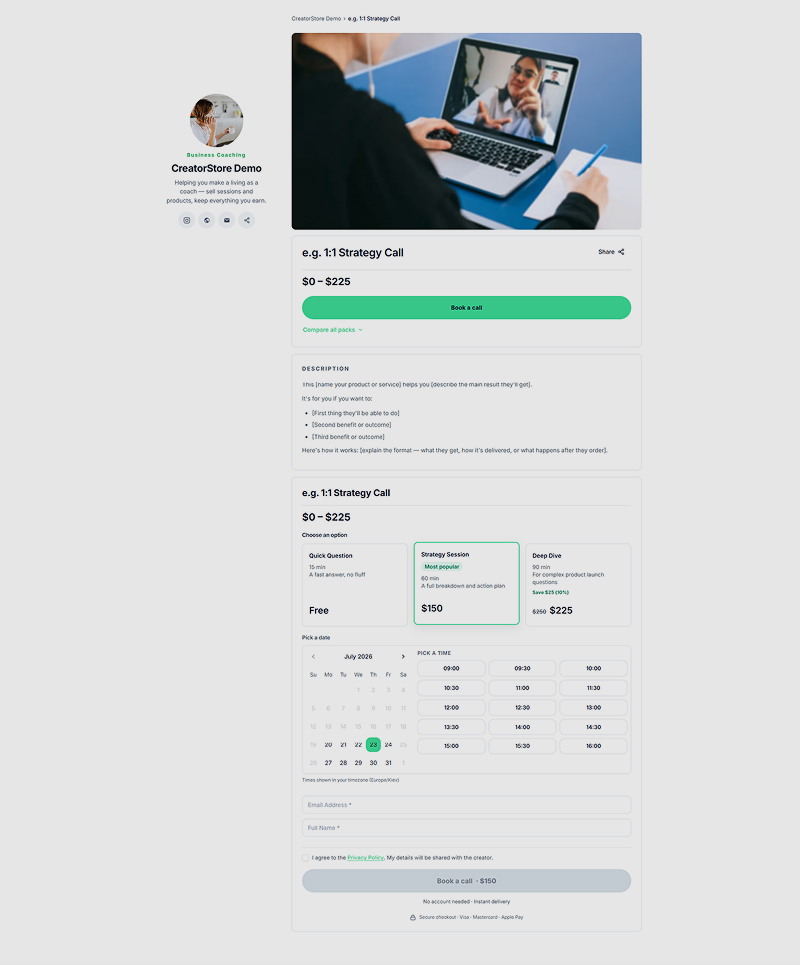 https://creatorstore.co/@demo-store/coaching-call
A working booking setup is what turns "let's find a time to talk" into a paid, automated process. With your product, checkout, session options and confirmation emails configured, your coaching calls run themselves while you focus on clients.
Setup is only half the picture. If you haven't defined your offer and pricing yet, start with our guide on how to sell 1:1 coaching calls online.